Author: Colin McDermott

  • Display your Trees and Carbon Impact with the Ecologi API in WordPress

    Display your Trees and Carbon Impact with the Ecologi API in WordPress

    Ecologi is a service organisations and individuals can use to plant trees and offset carbon usage.

    We are huge fans of Ecologi at Search Candy.

    Ecologi is clearly a product that has been built by geeks, for geeks, so naturally built into the service are two APIs that can let you either display your impact on your website, or to add more impact – automatically purchasing additional trees or carbon which will be added to your next bill.

    Read on for a guide to using the Ecologi reporting API to display your impact on a WordPress website.

    Ecologi Toolkit & Button

    First though, it may be useful to know that Ecologi also have a ‘toolkit’ page – where they host a selection of media and assets users can add to their site or marketing materials.

    If you are not technical at all, or don’t have the time to set up the API on your site, one of the features of the toolkit is a set of static and dynamic buttons. Using the dynamic buttons will show your live impact.

    You can choose between black text (for light backgrounds) or white text creating a button.

    Colour selector preview

    When linking to Ecologi don’t forget to use your ‘Invite friends‘ referral link that you can find on your profile page.

    Here is ours: https://ecologi.com/searchcandy?r=5d70ea8ba3aba90010b8babf

    Each person that signs up using your link will get you both 30 trees each.

    Ecologi API

    Once logged into your account, go to the ‘API’ tab in Ecologi via account settings area.

    Reporting API

    We are going to use Ecologi’s Reporting API.

    Ecologi Reporting API

    The reporting API is completely safe to use so doesn’t require authentication, access keys, or anything fancy like that, because all you are doing essentially is asking Ecologi to confirm the total tree/carbon numbers that they are already on your profile page.

    Endpoints

    There are 3 available API feed endpoints, depending on what you want to display:

    • 🌲 Trees only: https://public.ecologi.com/users/your-username/trees
    • 💪 Carbon offset only: https://public.ecologi.com/users/your-username/carbon-offset
    • 🌲+💪 Both trees & carbon: https://public.ecologi.com/users/your-username/impact

    Replace your-username with your Ecologi username.

    You will need at least one of these API endpoints to set things up later on.

    Each feed is provided in a JSON format. If you are web developer you might decide to work with the JSON using another method.

    For everyone else, read on for a plug-and-play guide to setting up the Ecologi API in WordPress using a plugin to import the feed and Gutenburg.

    If you aren’t using Gutenburg you can use a short-code instead to display the feed contents.

    Getting Started / Step by Step Guide

    We are going to take the JSON feed, pull in the data, and display it on our site for visitors to see.

    At this point you may want to have a think about what you want to display and where you want to display it.

    If you are working on a project that is totally focused around for example trees, then the carbon numbers may not be useful for you – so you only need to use the trees JSON feed, or vice versa.

    We decided to show both trees and carbon offset in different columns, and we wanted to add them to a single page where we talk about our climate work. Alternatively you might want to add them to your about page, footer, or even your homepage.

    If you have access to a WordPress web developer there are a few ways in WordPress that you could choose to work with the JSON feed, but we are going to keep this guide simple and use a plugin to handle the heavy lifting for us.

    JSON Content Importer WordPress Plugin

    Using the JSON Content Importer plugin it is possible to easily import and parse the JSON feed, then display the results right on your website, via a Gutenberg block, or a short-code.

    You can take a look at our page to get ideas/as a demo for how it can look.

    Step 1: Install and activate the JSON Content Importer plugin in WordPress.

    Step 2: Load up the page where you want to display the information and add the JSON block in Gutenburg which should now be available. If you search ‘json’ it should find the ‘JSON Content Importer FREE’ block which you can add to the page. See below:

    JSON block in Gutenburg
    Adding the JSON Content Importer block in Gutenburg

    Step 3: On the right hand side you should see the block settings. Paste the URL of the appropriate API endpoint (eg ‘trees only’) into the ‘API-URL’ box. You can see a screenshot of this, and the next step – under Step 4.

    Step 4: In the template box, you will need to use a template that matches up to and extracts the ‘total’ value. I use something along the lines of:

    <p>{total}</p>

    Your settings should look something like this:

    Block settings

    Step 5: If you want to add another metric, repeat steps 2-4 with a new block.

    I found setting up a two column layout in Gutenburg worked well, so you can have one column for trees and one for carbon.

    Once you are done, save/publish the page and you are good to go!

    Shortcode / Working with other page-builders

    If you are not using Gutenburg the JSON Content Importer plugin has a shortcode functionality that you should be able to use with any page builder or even just direct in a post/page.

    Here is an example short-code I have tested and can confirm works correctly on my site:

    [jsoncontentimporter url=https://public.ecologi.com/users/your-username/trees]{total}[/jsoncontentimporter]

    Last bits, Caching

    You might need to refresh the page a few times before the API information pulls in.

    Also be aware that if you have a caching plugin you may have to clear the cache each time.

    The JSON plugin actually has its own built in caching system, but we found this setting to be problematic so would recommend to disable it.

    I hope you have found this guide useful! If you have any questions or need help setting it up feel free to tweet me @ColinMcDermott.
  • Google Jobs Guidelines Updated and Direct Apply Property Added

    Google Jobs Guidelines Updated and Direct Apply Property Added

    It is been a busy week for those with an interest in recruitment SEO – Google have announced two significant new updates to their AI powered job service Google Jobs.

    On Tuesday in a Search Central blogpost Google released details on a new technical feature allowing recruitment sites to indicate if they allow direct applications, and also provided information on additional new editorial guidelines for job sites.

    Editorial Content Policy

    Google are launching a new editorial content policy for Google Jobs, scheduled to be implemented in October this year.

    The upcoming policy will include requirements such as:

    • Obstructive text and images
    • Excessive and distractive ads
    • Content that doesn’t add any value to the job listing
    • Follow basic grammar rules
    • Avoid unnecessary capitalisation

    Direct Apply – New ‘directApply’ property for job listings

    The new directApply property is an optional feature allowing recruitment sites to specify to Google that users can apply directly on the applicable page.

    The aim is to make it clearer to users whether they can actually apply directly on a site or not, avoiding the dreaded double application process that many sites currently use – whereby a user would fill in their details once whilst applying – only to be asked to be forwarded to another location and asked to fill in the very same details again on the next site.

    What is a direct apply experience?

    A direct apply application process should be ‘short and simple‘ without any ‘unnecessary intermediate steps‘.

    This includes any repeated action such as having to sign or log in more than once which would indicate that a website does not offer a direct apply experience.

    Google have created an illustration that attempts to illustrate this process and show the shorter, faster, and ultimately more preferable route for job applicants.

    New directApply property - A short direct apply experience, vs an extended non-direct apply application process

    Above – a short direct apply experience, vs an extended non-direct apply application process.

    If the user has to click apply, complete an application form, sign in or log in more than once in the application journey, it means that you aren’t offering a direct apply experience.

    Google Developer docs

    How to improve trust

    Google also listed some issues based on research they have conducted that job sites should attempt to avoid in order to improve candidate trust. The expanded list is in the blog post but I have summarised it below:

    • Verify that there are no scammy or spammy job posts on your site
    • Ensure a good user experience
    • Remove expired job posts
    • Make sure that the job’s posting date is genuine
    • Don’t include wrong or misleading information in the job post or the markup

    Hat tip to Search Engine Roundtable.

    Find out more about recruitment SEO here, or check out our guide to Google Jobs.

  • Does Google Index Text Content in CSS Pseudo Elements?

    Does Google Index Text Content in CSS Pseudo Elements?

    Traditionally when Google (or other search engines) look for text-based content to index – they expect to find this content directly in the HTML of the webpage that is served to them.

    This changed somewhat with the rise of sites using JavaScript to serve anywhere from small pieces of content to entire websites.

    Google was forced then to invest resources attempting to render and index JavaScript based content as effectively as possible.

    CSS Pseudo Elements

    But what about text content that is sourced purely from CSS? It is possible to add content to a page using CSS pseudo elements such as ::before and ::after combined with the CSS content property.

    See a simple example below:

    <p>99 bottles of beer on the wall, 99 bottles of beer.</p>
    p::after {content:' Take one down and pass it around,
    98 bottles of beer on the wall.'}

    Will display as:

    99 bottles of beer on the wall, 99 bottles of beer. Take one down and pass it around, 98 bottles of beer on the wall.

    Year after year as CSS gets more advanced and other features are introduced, such as the ability to do mathematical calculations or count elements using only CSS, the likelihood of devs and designers adopting these features becomes higher.

    But will Google be able to render and index this content? Will the text found in the CSS appear and be searchable in Google?

    Is using CSS for text best practice?

    Before we start it is important to note that in the large majority of situations using CSS pseudo elements and the ‘content’ property (instead of HTML) to display any significant amount of text based content on a website is absolutely not best practice for various reasons, including:

    1. The text is not selectable by users, meaning it can’t be highlighted or copied/pasted
    2. The text will be ignored by screen readers – making the content inaccessible and against accessibility guidelines.

    F87: Failure of Success Criterion 1.3.1 due to inserting non-decorative content by using :before and :after pseudo-elements and the ‘content’ property in CSS

    W3.org

    CSS pseudo elements should generally speaking only be used for decorative elements that are non-essential to the consumption of the content on the page.

    SEO Poll

    Until the production of this article – I was not able to find any other SEO-focused articles on this topic, so I thought it could be interesting to dig in and so some research.

    I asked the SEO community what they thought in a Twitter poll, with the following results:

    Taking out users that just wanted to see the results, there is a fairly even split between the three choices with ‘No’ and ‘I don’t know’ getting an equal number of votes (12), and ‘Yes’ trailing behind by just a few votes (9).

    Test

    To test I created a page that contained zero standard HTML based content and added text content using CSS pseudo elements attached to heading, paragraph, div and link tags – sourced from an external file CSS file.

    You can also view the code and resulting page on CodePen here.

    To give the URL a little boost to help it get indexed more quickly (or indeed at all) I linked to it temporarily from the footer of the site.

    Rendering

    To test I also ran the page through the Fetch tool in Search Console and the Mobile Friendly testing tool.

    Both showed that Google were able to fully render the CSS content as it appeared to normal users on the page.

    Results

    Eventually (slightly to my surprise) the page did get indexed in Google despite the complete lack of content.

    However checking the resulting listing in Google, and after searching for strings of text from the page – it became clear that no actual content had been indexed.

    So we can confirm from this test that: NO – although Google can render it, CSS based content will not currently be indexed in Google.

    If you include text content on your site using CSS pseudo elements and the CSS ‘content’ property it is currently not possible for Google to index the text content.

    Update (14/7/2021)

    The fantastic Jess Peck alerted me to a previous test she conducted on the same subject you can view here, and another post/experiment from Mathias Bynens that doesn’t use any HTML at all.

  • Review: CloudFlare WordPress Automatic Platform Optimization (APO)

    Review: CloudFlare WordPress Automatic Platform Optimization (APO)

    Check out our review based on our direct experience testing out the new service on the Search Candy website.

    CloudFlare APO Review

    TL:DR: I would say the APO service should still be in beta.

    First, what is the CloudFlare WordPress APO?

    With Automatic Platform Optimization (APO) Cloudflare will serve your entire site from our edge network, ensuring that customers see improved performance when visiting your site. Typically Cloudflare only caches static content, but with APO we can also cache dynamic content like HTML so the entire site is served from cache. This removes round trips from the origin drastically improving TTFB and other site performance metrics.

    CloudFlare support docs

    I am a big CloudFlare fan – I think the service has a huge amount of potential – but its important to understand what CF is actually capable of and ignore any of the “black magic” vibes that people assign to it.

    CloudFlare and their products either work – and ideally speed up/secure your site – or they don’t, and they are a waste of money.

    Supported Plugins

    Here is the official list of WordPress plugins that are confirmed by CF to work with the new WordPress APO (source) – updated September 2021.

    • WP Rocket
    • BigCommerce
    • Easy Digital Downloads
    • WooCommerce
    • YITH WooCommerce Wishlist
    • WP EasyCart
    • Ecwid Ecommerce Shopping Cart
    • WP ECommerce
    • Bookly
    • WPTouch
    • Mobile Detect
    • WordPress Mobile Pack
    • WP-Mobilizer
    • WP Mobile Edition
    • Any Mobile Theme Switcher
    • Easy Social Share Buttons
    • Jetpack (Mobile Theme)
    • wiziApp
    • WPML

    Quite a small list. If your site uses any WordPress plugin that is not on that list, then its compatibility with the APO is not supported by CloudFlare or guaranteed to work.

    Specifically you may note that there are no caching/site optimisation plugins on the list. Update: CloudFlare have now added WP Rocket to the list of compatible plugins.

    The lack of support for optimisation plugins is at the root of all the issues I had with the service.

    It is simply not designed for users who have independently made any web perf optimisations to their site, such as installing a caching plugin, removing resources via AutoOptimize, or similar.

    On installing the CloudFlare plugin (required to use the service), my site’s footprint increased in size from a manageable number of well optimised resources, to over 70+ unoptimised files.

    The CloudFlare plugin essentially de-optimises your sites resources, then tries to cache them at the edge.

    Interactions with support etc have not been great so far.

    Use a plugin not on CloudFlare’s list of ~20 compatible plugins? That’s a ‘user misconfiguration error’

    Which Caching & Performance Optimisation Plugins work with the CloudFlare APO?

    So far we have tested the following plugins with the CloudFlare APO:

    LiteSpeed Cache for WordPress

    Compatibility with CloudFlare APO: 0/10.

    Instantly breaks the site. We were not able to find a combination of plugin settings or a setup that did not result in a broken site.

    Has a direct integration via API allowing you to clear the CF cache directly.

    FlyingPress

    Compatibility with CloudFlare APO: 5/10.

    Doesn’t result in a broken site, but does not have any integration with CloudFlare. Recommended setting (as per FlyingPress docs) is to turn off page caching in FlyingPress whilst using the CF APO.

    HummingBird

    Compatibility with CloudFlare APO: 8/10.

    Works well with the CloudFlare APO and has an API integration allowing you to clear the CF cache directly.

    Conclusion

    My recommendation to anyone who was interested in testing it out would be: by all means test it out, but don’t expect it to improve your site speed if you have already made a reasonable attempt at this already.

    Perhaps in 6-12 months CF will have improved the service to the point where it works with other optimisation plugins.

    Your mileage may vary. Perhaps there is a caching plugin or server/site settings combo that DOES play friendly. But I haven’t found it.

    There may be people reading this who have no interest in web perf but who do like the sound of a paid service aimed at WordPress that tries to do some of the work for you.

    With the added pressure of Google adding Core Web Vitals performance in search rankings – due to hit in May 2021, potentially millions of businesses will be looking to solutions like this.

    Personally for me the test is over for now, I have moved back to using our original CDN in the meantime, and site speed is back to normal.

    March 2022 Update

    Another test of CloudFlare’s APO, and results have not improved. We attempted to use the APO again – and tested the results. Every aspect of the site performance worsened: speed, total resource size, request numbers, and in the lab Core Web Vitals scores dropped.

  • How to Fix ‘New Job Postings issues detected’ Error Messages in Search Console

    How to Fix ‘New Job Postings issues detected’ Error Messages in Search Console

    If you have Google Search Console set up for your recruitment website (or indeed any website that hosts job listings) then you may well have received an email titled as per the below at some point – if not dozens of times:

    New Job Postings issues detected for site https://www.example.com/

    So what does this email mean, and is it a problem you need to take care of? We will explain everything in this blog post.

    First things first, let’s make sure we understand the basics.

    Why am I getting this ‘New Job Postings issues detected’ email?

    If you have received one of these emails – whether you are the main contact in Search Console, or it has been forwarded to you to deal with – we can state with certainty that the following is likely true:

    • Your website has been set up/connected to Google Search Console
    • Google has found some jobs listed on your website
    • These jobs listed on your site are at least partially using the Job Posting structured data format
    • Google have detected some kind of error or issue with the Job Posting structured data as it is used on your website

    Initial Steps

    The first step with anything like this is simply to make sure you have access to Google Search Console.

    If it has been set up by someone else who may have left the company or at a previous marketing agency, you may have to either ask them to add you as a user, for the account details (if a generic/shared account is being used for access), or if all else fails you may have to go about getting yourself set up/verified in Search Console.

    Once you are logged into Search Console, be aware that you may have more than one website, or ‘Property’ as they are known, inside your Search Console account, so make sure you have the correct one selected.

    To do this you can navigate to the property for the domain you received the email for using the ‘Select property’ dropdown list in the top left of the screen.

    Enhancements > Job Postings

    Once logged into Search Console and you have the correct domain property you will need to navigate to the Job Postings section under ‘Enhancements’ in the sidebar. See the image below:

    Enhancements > Job Postings screenshot
    Screen-capture of the ‘Enhancements’ section in Search Console

    From here you should be able to see three tabs: Error, Valid with warning, and Valid.

    Using the two tabs that highlight errors and warnings, you can work through and diagnose which parts of your code/data are causing issues.

    Errors vs Warnings – What is the difference?

    Errors show when a required piece of information has not been provided. These need to be corrected or the job listing will be unlikely to show.

    Warnings on the other hand occur when an optional piece of information is missing. These are more optional, but for the sake of a quality listing you should still consider fixing them.

    If necessary you will may need to work with your developers to repair, or add in, extra bits of structured data.

    Different issues you can face include missing or incorrectly formatted data.

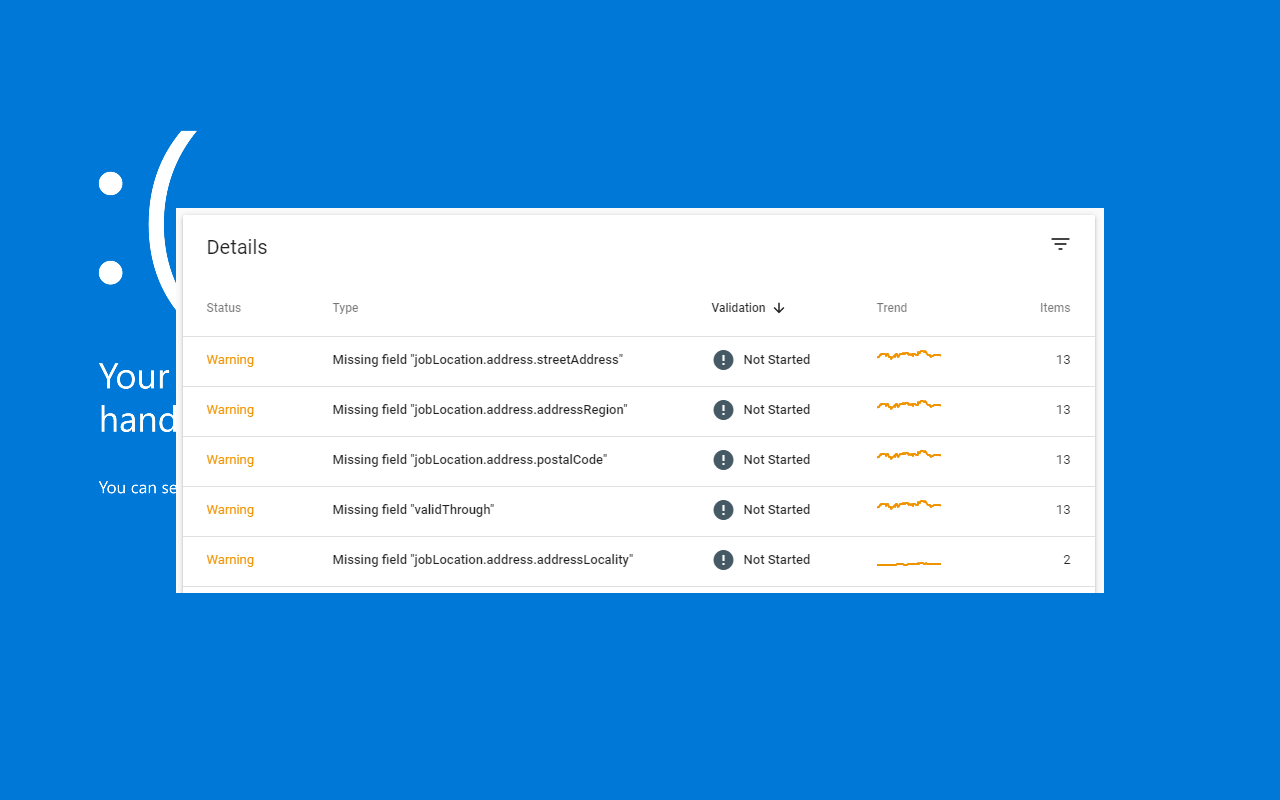
    Job Posting warnings
    Examples of Job Posting warnings in Search Console

    Job Postings – Quick Guide

    Currently there are 6 required properties and 5 additional recommended properties to include in your Job Postings structured data.

    Required properties

    There are 6 required properties for job postings:

    • datePosted
    • description
    • hiringOrganization
    • jobLocation
    • title
    • validThrough

    In addition to this there are also 5 recommended properties to think about including:

    • applicantLocationRequirements
    • baseSalary
    • employmentType
    • identifier
    • jobLocationType

    You can read more about Job Posting structured data and Google Jobs in our guide here.

    Specific Error Reporting in Search Console

    In December 2019 Google made an update to how they reported errors, aiming to be as specific as possible with regards to the issues affecting job listings.

    This means that users looking at historical errors around this time may see fluctuations in the number of reported errors.

    Search Console now reports more specific error types of Job Posting errors. Therefore you might see a reduction in certain generic error types, with a corresponding increase in new, more specific error types (if you have not already fixed those issues). The total number of errors should not change as a result of this update.

  • Google Add Integration for TikTok & Instagram Videos into Mobile Results

    Google Add Integration for TikTok & Instagram Videos into Mobile Results

    As reported in SERoundTable early on the 28th of December, and TechCrunch on the 29th, Google have this week introduced a new integration for TikTok and Instagram content via the Short Videos Carousel.

    TL;DR? Read this article as a Web Story

    Users of mobile search via the browser or mobile app may encounter short-form videos from either of the two platforms.

    Short Videos Carousel

    The Short Videos Carousel was first spotted in April and thought to be one of the many new features Google introduces and tests for success every year.

    Previously the Short Videos Carousel only featured content from YouTube. Now Google also appear to be surfacing short video content from both TikTok and Instagram.

    The TechCrunch article incorrectly stated that the feature would only be available via the Google app. In testing we were able to confirm that the feature is available via Google web mobile search – and the original tweet from Brian Freiesleben (@type_SEO) first spotting the new feature indeed shows a screen of Google mobile search in a browser, not the app.

    Examples

    Does the Short Videos Carousel appear on desktop?

    No it does not – both at the time of writing, and likely for a reasonably long period going forward into the future.

    Short video platforms and features such as TikTok, Instagram, Facebook Stories and Twitter Fleets – are all primarily mobile focused.

    Although they are are also usually available on desktop in one form or another – these videos tend to be vertical – making them ideal for viewing on mobile devices – and generally speaking are designed to be quickly consumed short-form videos.

    TechCrunch reached out to Google and a spokesperson confirmed that this test would only currently be available on mobile, and appear only with a limited amount of web searches.

    A company spokesperson confirmed to TechCrunch the feature was currently being piloted on mobile devices. They clarified that means it’s a limited, early-stage feature.

    Google almost certainly will have come to behind the scenes arrangements with TikTok and Instagram to make this happen.

    Although the feature is experimental, it represents the direction Google are moving in: working with the mass public shift from desktop to mobile search creating features designed to keep users coming back for more.

  • Google Search Console ‘Request Indexing’ Tool Returns

    Google Search Console ‘Request Indexing’ Tool Returns

    Just in time for the New Year, Google has at last returned the Request Indexing function tied to the URL Inspection tool in Search Console.

    (more…)
  • Core Web Vitals: Google Set May 2021 Date for Page Experience Search Ranking Update

    Core Web Vitals: Google Set May 2021 Date for Page Experience Search Ranking Update

    Google posted on Tuesday the date they expect to push live the previously announced page experience search ranking update: May 2021.

    Page Experience

    Back in May of this year Google announced that they would be integrating various page experience related ranking signals into their algorithms. 

    Page experience signals relate to how users perceive the experience of visiting and using a web-page.

    Primary page experience signals include factors such as: how long a page takes to load, how long it takes to become interactive, and the stability of different elements on a web-page as it loads.

    Originally announced by the Google Chrome team: ‘Web Vitals’, aka ‘Core Web Vitals‘ are a new set of page experience metrics developed by Google – designed to allow for a unified and improved collaboration on improving user experience across the web.

    New Integrations

    As well as the metrics themselves, Google revealed integrations across their suite of testing and reporting tools, from Lighthouse / Web.Dev, to a new Core Web Vitals report in Google Search Console itself.

    This new report in Search Console allows webmasters to see the collated page experience results for users in bulk across different URLs on a website assuming enough data has been collected – something which can be a problem for smaller sites.

    Google stated at the time that they ultimately expected the new metrics to be used in the forthcoming search ranking updates.

    Date Announced

    Well the specific time for that integration has now been announced, and the date will be essentially one year after the original announcement: May 2021.

    As stated in Tuesday’s blogpost on the Webmaster Central blog, Google will be combining Core Web Vitals with existing ranking signals such as mobile-friendliness, HTTPS usage, and intrusive mobile interstitials, as shown in the following graphic.

    Where Core Web Vitals will fit into the upcoming search ranking update
    Graphic showing where Core Web Vitals will fit into the upcoming search ranking update

    So what does this mean in simple terms? It means that Google’s new page experience metrics will have an impact on the SEO of websites.

    Realistically the new signals will probably start off quite weak as ranking factors, and may then over time get tightened up as Google gain confidence in their ability to provide reliable results for users.

    In other Core Web Vitals news, today Chris Johnson released a Core SERP Vitals Chrome extension that enables users to see Core Web Vitals information pulled from the Chrome User Experience Report, direct in Google search results.

    This could be useful if you want to see a really quick score to compare sites, without having to run a report manually.

    Core SERP Vitals
  • Google’s .New Domains – What Are They & 20+ Shortcut List

    Google’s .New Domains – What Are They & 20+ Shortcut List

    A curated list of useful .new domain names with an explanation of what they are.

    ServiceDomainWhat do you get?
    WordPressBlog.newNew WP.com blog post
    CodaCoda.newNew document
    CanvaDesign.newNew graphic
    GoogleDoc.newNew Google Doc
    MicrosoftExcel.newNew Excel document
    GoogleForms.newNew Google Form
    GitHubGist.newNew GitHub gist
    StripeInvoice.newNew invoice
    WebexLetsmeet.newNew meeting
    Bit.lyLink.newNew Link
    GoogleMeeting.newNew Google Calendar meeting
    GoogleNote.newNew Google Keep note
    MicrosoftOffice.newOffice dashbaord
    SpotifyPlaylist.newPlaylist
    SpotifyPodcast.newPodcast
    eBaySell.newNew item to sell
    GoogleSheet.newGoogle Sheets
    GoogleSite.newGoogle Sites
    GoogleSlide.newGoogle Slides
    MediumStory.newStory page
    StripeSubscription.newNew subscription
    AsanaTask.newAsana
    MicrosoftWord.newNew Word doc

    You can view the full list of .New domains here.

    .new domain graphic

    What are .new domains?

    Introduced by Google in 2018, and opened up to additional companies in 2019, .new domains are designed to be shortcuts to common new actions on the web.

    The idea is that loading the domain name should take you straight to the new service.

    For example if you want to launch a new spreadsheet, you would go straight to the new sheet – instead of having to go to a dashboard and then click ‘new spreadsheet’ or similar.

    “Posting, linking, designing, recording — it’s all possible with action-based .new links. Replace menus and long URLs with easy-to-remember shortcuts.”

    You can find out more about dot new domains on the Whats.new website.

    .new animation

    Can I get a .new domain for my website/business?

    You can apply for a .new domain on Get.new if you think you have a suitable web action.

    Google may reject your application if they think it is unsuitable.

    Google .new domains are unlikely to be suitable for a large number of different types of websites.

    For example if you have an e-commerce website, blog, portfolio site, or similar – a .new domain would almost certainly not be appropriate.

    Security, HTTPS & HSTS

    Google like to focus on security with their domains, and like other Google domain extensions (such as .dev), .new domains have HSTS built-in and turned on by default.

    This means that users visiting a .new domain will always be automatically forwarded (using a 307 redirect) to the secure version of the website if they attempt to visit a non-secure URL.

    For example when a user visits http://docs.new it will yield a 307 redirect to https://docs.new, then a 302 redirect to the new document.

  • Google: Here’s How to List Work From Home Jobs

    Google: Here’s How to List Work From Home Jobs

    In response to an upsurge in work-from-home (WFH) recruitment positions following COVID-19, Google have repeated their advice on how companies and recruitment agencies making use of Google Jobs Search (aka Google for Jobs) can markup their jobs to highlight WFH positions.

    (more…)
  • Google Dorks to Find Hacked Websites & Parasite SEO Spam

    Google Dorks to Find Hacked Websites & Parasite SEO Spam

    With some fairly rudimentary search skills it is possible to both find and monitor for compromised web-pages and parasite SEO spam.

    (more…)
  • Pre-Instagram Photo Sharing Giant Fotolog Now Spam Blog

    Pre-Instagram Photo Sharing Giant Fotolog Now Spam Blog

    Long-standing photo sharing site Fotolog has quietly shut-down and been turned into an SEO spam blog.

    (more…)