Tag: Recruitment

  • Google Jobs Guidelines Updated and Direct Apply Property Added

    Google Jobs Guidelines Updated and Direct Apply Property Added

    It is been a busy week for those with an interest in recruitment SEO – Google have announced two significant new updates to their AI powered job service Google Jobs.

    On Tuesday in a Search Central blogpost Google released details on a new technical feature allowing recruitment sites to indicate if they allow direct applications, and also provided information on additional new editorial guidelines for job sites.

    Editorial Content Policy

    Google are launching a new editorial content policy for Google Jobs, scheduled to be implemented in October this year.

    The upcoming policy will include requirements such as:

    • Obstructive text and images
    • Excessive and distractive ads
    • Content that doesn’t add any value to the job listing
    • Follow basic grammar rules
    • Avoid unnecessary capitalisation

    Direct Apply – New ‘directApply’ property for job listings

    The new directApply property is an optional feature allowing recruitment sites to specify to Google that users can apply directly on the applicable page.

    The aim is to make it clearer to users whether they can actually apply directly on a site or not, avoiding the dreaded double application process that many sites currently use – whereby a user would fill in their details once whilst applying – only to be asked to be forwarded to another location and asked to fill in the very same details again on the next site.

    What is a direct apply experience?

    A direct apply application process should be ‘short and simple‘ without any ‘unnecessary intermediate steps‘.

    This includes any repeated action such as having to sign or log in more than once which would indicate that a website does not offer a direct apply experience.

    Google have created an illustration that attempts to illustrate this process and show the shorter, faster, and ultimately more preferable route for job applicants.

    New directApply property - A short direct apply experience, vs an extended non-direct apply application process

    Above – a short direct apply experience, vs an extended non-direct apply application process.

    If the user has to click apply, complete an application form, sign in or log in more than once in the application journey, it means that you aren’t offering a direct apply experience.

    Google Developer docs

    How to improve trust

    Google also listed some issues based on research they have conducted that job sites should attempt to avoid in order to improve candidate trust. The expanded list is in the blog post but I have summarised it below:

    • Verify that there are no scammy or spammy job posts on your site
    • Ensure a good user experience
    • Remove expired job posts
    • Make sure that the job’s posting date is genuine
    • Don’t include wrong or misleading information in the job post or the markup

    Hat tip to Search Engine Roundtable.

    Find out more about recruitment SEO here, or check out our guide to Google Jobs.
  • How to Fix ‘New Job Postings issues detected’ Error Messages in Search Console

    How to Fix ‘New Job Postings issues detected’ Error Messages in Search Console

    If you have Google Search Console set up for your recruitment website (or indeed any website that hosts job listings) then you may well have received an email titled as per the below at some point – if not dozens of times:

    New Job Postings issues detected for site https://www.example.com/

    So what does this email mean, and is it a problem you need to take care of? We will explain everything in this blog post.

    First things first, let’s make sure we understand the basics.

    Why am I getting this ‘New Job Postings issues detected’ email?

    If you have received one of these emails – whether you are the main contact in Search Console, or it has been forwarded to you to deal with – we can state with certainty that the following is likely true:

    • Your website has been set up/connected to Google Search Console
    • Google has found some jobs listed on your website
    • These jobs listed on your site are at least partially using the Job Posting structured data format
    • Google have detected some kind of error or issue with the Job Posting structured data as it is used on your website

    Initial Steps

    The first step with anything like this is simply to make sure you have access to Google Search Console.

    If it has been set up by someone else who may have left the company or at a previous marketing agency, you may have to either ask them to add you as a user, for the account details (if a generic/shared account is being used for access), or if all else fails you may have to go about getting yourself set up/verified in Search Console.

    Once you are logged into Search Console, be aware that you may have more than one website, or ‘Property’ as they are known, inside your Search Console account, so make sure you have the correct one selected.

    To do this you can navigate to the property for the domain you received the email for using the ‘Select property’ dropdown list in the top left of the screen.

    Enhancements > Job Postings

    Once logged into Search Console and you have the correct domain property you will need to navigate to the Job Postings section under ‘Enhancements’ in the sidebar. See the image below:

    Enhancements > Job Postings screenshot
    Screen-capture of the ‘Enhancements’ section in Search Console

    From here you should be able to see three tabs: Error, Valid with warning, and Valid.

    Using the two tabs that highlight errors and warnings, you can work through and diagnose which parts of your code/data are causing issues.

    Errors vs Warnings – What is the difference?

    Errors show when a required piece of information has not been provided. These need to be corrected or the job listing will be unlikely to show.

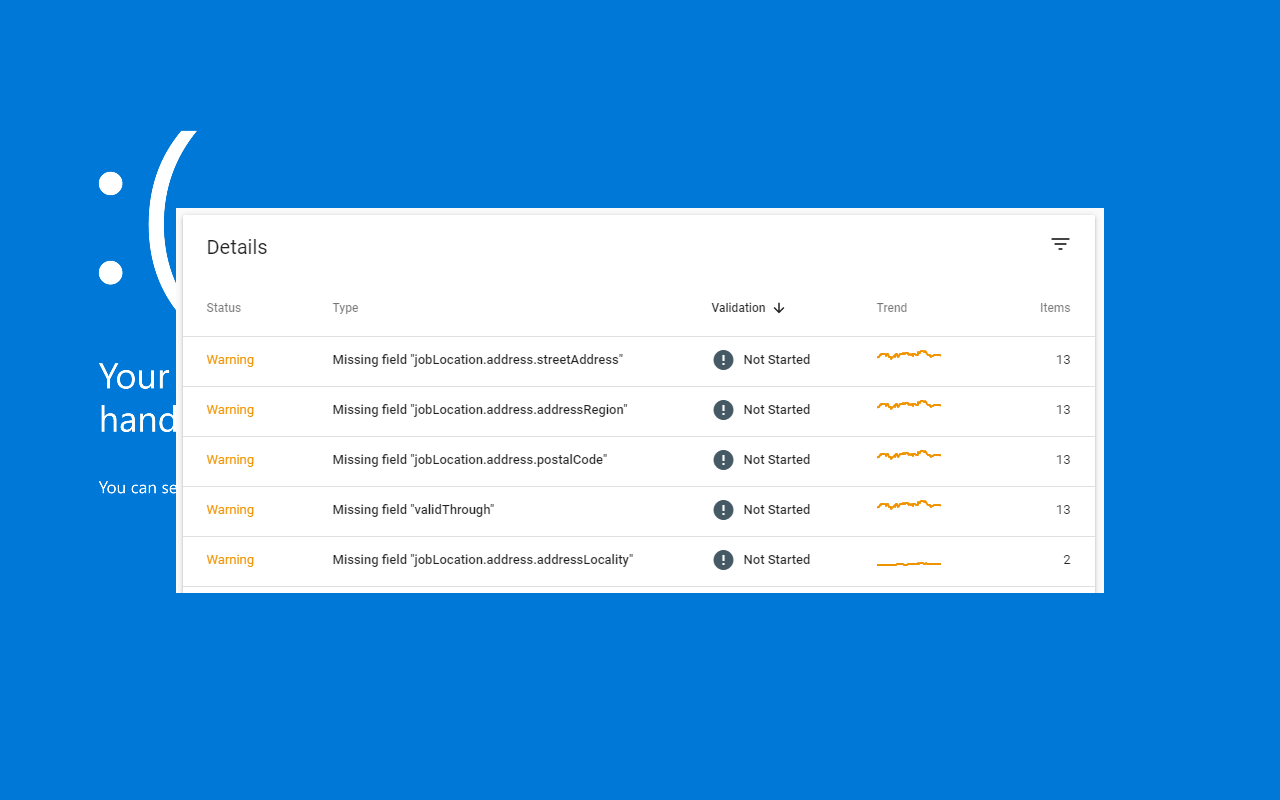
    Warnings on the other hand occur when an optional piece of information is missing. These are more optional, but for the sake of a quality listing you should still consider fixing them.

    If necessary you will may need to work with your developers to repair, or add in, extra bits of structured data.

    Different issues you can face include missing or incorrectly formatted data.

    Job Posting warnings
    Examples of Job Posting warnings in Search Console

    Job Postings – Quick Guide

    Currently there are 6 required properties and 5 additional recommended properties to include in your Job Postings structured data.

    Required properties

    There are 6 required properties for job postings:

    • datePosted
    • description
    • hiringOrganization
    • jobLocation
    • title
    • validThrough

    In addition to this there are also 5 recommended properties to think about including:

    • applicantLocationRequirements
    • baseSalary
    • employmentType
    • identifier
    • jobLocationType

    You can read more about Job Posting structured data and Google Jobs in our guide here.

    Specific Error Reporting in Search Console

    In December 2019 Google made an update to how they reported errors, aiming to be as specific as possible with regards to the issues affecting job listings.

    This means that users looking at historical errors around this time may see fluctuations in the number of reported errors.

    Search Console now reports more specific error types of Job Posting errors. Therefore you might see a reduction in certain generic error types, with a corresponding increase in new, more specific error types (if you have not already fixed those issues). The total number of errors should not change as a result of this update.

  • Google: Here’s How to List Work From Home Jobs

    Google: Here’s How to List Work From Home Jobs

    In response to an upsurge in work-from-home (WFH) recruitment positions following COVID-19, Google have repeated their advice on how companies and recruitment agencies making use of Google Jobs Search (aka Google for Jobs) can markup their jobs to highlight WFH positions.

    (more…)
  • 10 Tips To Help You Get an SEO or Digital Marketing Job in Manchester

    10 Tips To Help You Get an SEO or Digital Marketing Job in Manchester

    Manchester and nearby Salford have a thriving online and digital marketing sector, with hundreds of agencies, as well as many thousands of companies and organisations all requiring staff.

    (more…)