Category: Ecommerce

Learn and keep updated with best practice articles and guides for anyone that wants to learn more about ecommerce and ecommerce SEO.

  • Best Ecommerce Platforms

    Best Ecommerce Platforms

    Compare the best ecommerce platforms by a range of metrics and categories, from SEO, to pricing and ease of use.

    Unlike pretty much every single other article on the internet comparing ecommerce platforms, this guide has no affiliate links, and is – we hope – as unbiased as possible.

    Choosing a platform

    Choosing the right ecommerce platform is something to consider very carefully.

    Once you have your site set up and products added, changing platforms isn’t always easy: migrations and site redesigns will often lead to SEO issues and lost traffic.

    So what should you look for in an ecommerce platform? The answer to this question depends quite a lot on your needs, and level of technical resources.

    Some of the main things to consider when choosing an ecommerce platform include:

    • Security
    • Pricing and upgrades
    • Features
    • Ease of use
    • Plugins and extensions
    • Developers
    • Support
    • SEO
    • Growth and scalability
    • Performance

    The best and most popular ecommerce platforms usually have a wide feature set and an eco-system of agencies and freelance web developers that can help you fix problems and implement features on your website.

    The biggest ecommerce systems often have a plugin/app store where you can download and install plugins, to extend and improve the functionality of the platform.

    Some platforms can be more flexible and more powerful than others, but you should look into how good developer support is if you don’t have the in-house resources already to take care of development.

    Whether you are starting your first ecommerce store or are already running a large ecommerce site, we have a range of options to cover you.

    Hosted / SaaS Ecommerce Platforms

    Hosted or SaaS (software-as-a-service) ecommerce platforms handle the hosting for you, which takes away a lot of the work of server management and software upgrades.

    This can be great for small businesses and people that don’t have the financial or technical resources to invest in development.

    Below we list some of the best hosted ecommerce platforms available to companies in the UK.

    Shopify

    Shopify is the most popular hosted SaaS ecommerce platforms in the world in 2022 and has a full eco-system of plugins and developers that can help you build your store.

    Extend the functionality of your e-commerce store with access to thousands of free and paid plugins and bespoke services designed specially for Shopify.

    Shopify is a good choice for small and medium sized ecommerce operations, and for larger sites there is Shopify Plus.

    Out of the box you can quickly set up an ecommerce store that will function well – but make sure to customise your store unless you want people to think it looks generic and untrustworthy.

    Pricing

    Shopify’s pricing starts at £24 per month for a basic site, rising to £69 and £259 for more features.

    BigCommerce

    BigCommerce is a hosted ecommerce platforms for all sizes of businesses from small to large.

    With BigCommerce you can set up a site in minutes and make use of the offered 15 day free trial in case you change your mind.

    BigCommerce has an app marketplace with a range of different apps to help extend your stores features.

    For large high performance ecommerce sites, with BigCommerce you can also make use of headless ecommerce using their APIs.

    Pricing

    BigCommerce pricing starts at $29.95 for the cheapest package, increasing to $79.95 and $299.95 for the larger packages.

    Wix

    Wix could be a good option for beginners with no web design experience and a small budget.

    The Wix platform has a decent range of apps in their marketplace and a lot of different drag-and-drop features that you can use to build out your site, including ecommerce functionality.

    However the functionality of the Wix platform is limited compared to some of the competitors and the eco-system is not as big.

    Pricing

    Wix’s pricing is below that of the main competitors, with prices for the business/ecommerce packages starting at £13 a month, going up to £22 per month for more features.

    Squarespace

    Squarespace is another good platform for beginners that can help you to build a beautiful ecommerce store.

    Often used by creatives and people who want to design things their own way, Squarespace is a good platform for people who want to set up a simple ecommerce store in the cloud.

    Again however the platform does not have as many advanced features and upgrades available as the best competitors.

    Pricing

    Squarespace’s ecommerce pricing starts at £15 per month for a pared down basic offering, rising to £20 and £30 per month for more fully featured offerings.

    Best Overall SaaS Ecommerce Platform

    Shopify is without a doubt the best hosted ecommerce platform available in our opinion, and according to many other ecommerce experts.

    The combination of ease of use with the availability of powerful upgrades and an eco-system of different apps makes Shopify hard to beat for small, medium sized, and even large businesses with Shopify Plus.

    Self Hosted Ecommerce Platforms

    Self hosted ecommerce platforms involve managing your own hosting infrastructure and software installations.

    The benefit of self hosted is you own your own infrastructure so can upgrade and downgrade as you decide, and have more control overall – which can potentially be more cost effective as well as flexible compared to a hosted solution on someone else’s hardware.

    Self hosted (and ideally open source) platforms generally speaking also provide more flexibility at the software level – allowing you to make customisations to themes and code as needed, something that is rarely possible with hosted solutions.

    WooCommerce

    WooCommerce is the most widely used self hosted ecommerce platform in the world as of 2022.

    Highly flexible and able to make use of the rich and wide WordPress open-source infrastructure, WooCommerce has access to a huge range of both free and paid plugins to extend functionality.

    There are a huge number of talented WooCommerce developers and agencies available to help you build and manage your WooCommerce site.

    SEO functionality for WooCommerce can be tuned to be excellent and there are a wide range of plugins to help you sort out the SEO basics.

    Magento (Adobe Commerce)

    Magento, or Adobe Commerce as it is now known as, is a self hosted ecommerce platform that has long been a popular choice for a range of mid to large sized ecommerce sites.

    Magento is highly flexible and customisable and has add-ons available for many different functionalities.

    Development can be very expensive and good Magento developers can be hard to find.

    Although add-ons are available and with good theme development many SEO functionalities can be provided, the amount of and quality of reliable SEO plugins to extend Magento are just not as good when compared to WooCommerce which can utilise WordPress plugins.

    Magento is far from being an easy to use platform, so is not suitable for beginners or operations with low or no technical resources.

    Best Overall Self Hosted Ecommerce Platform

    WooCommerce is our recommendation for the best self-hosted ecommerce platform, though Magento is also an excellent choice.

    Best Ecommerce Platforms for SEO

    Many e-commerce platforms can have outdated or sub-standard SEO features out of the box – which means they can require a heavy investment and lots of customisation to get them to the same level as other more mature e-commerce platforms such as WooCommerce or Shopify Plus will provide.

    The best ecommerce platform for SEO depends a little on the resources and skill level you have available.

    If you do not have access to an SEO professional who can help you with the best ecommerce SEO setup, a hosted ecommerce platform may be the best – such as Shopify or BigCommerce.

    However if you do have the ability or resources to hire someone to optimise your site, WooCommerce is our recommendation for the best ecommerce platform for SEO – due to how flexible, powerful, and easy to customise it is compared to hosted alternatives.

    If we had to choose one single platform to call the best for SEO, it would be WooCommerce.

    Best Ecommerce Platforms for Small Business

    Not all small businesses have the same needs, however generally factors like pricing, ease-of-use, as well as a wide plugin and developer ecosystem are things to look out for.

    Shopify is a great recommendation for any small ecommerce business. Shopify provide access to everything a small site needs to get started, and more.

    WooCommerce is another excellent option for smaller ecommerce businesses. It can require a little bit more technical work to get started than hosted alternatives like Shopify – but offers access to huge ecosystem and number of ecommerce features, plugins and more.

    Best Ecommerce Platforms for Enterprise

    Enterprise ecommerce is a different beast to everything else. Many top ecommerce sites use a combination of different platforms and integrations – often custom built, and headless ecommerce is becoming the gold-standard for site infrastructure.

    The selection process for choosing ecommerce platforms at enterprise level can be complex – more than we can hope to cover in one article.

    Shopify Plus is one popular choice for enterprise level headless ecommerce.

    Magento/Adobe Commerce is another popular choice at enterprise level.

    Headless ecommerce can come with SEO challenges – it is important that Google and other search engines are able to render your site.

    We hope this ecommerce SEO guide was useful. For more ecommerce content check the related article links below or subscribe on Twitter @SearchCandy.


  • Google’s Helpful Content Update & Ecommerce

    Google’s Helpful Content Update & Ecommerce

    Google announced this week the upcoming launch of what they have named the Helpful Content Update.

    If you own or manage the SEO for an ecommerce website, you might be wondering how this update could affect you.

    Read on for our helpful content update ecommerce assessment and predictions, as well as some considerations for how to move forward over the next few weeks as the update rolls out.

    Update: the Google Helpful Content Update started rolling out today, the 25th August 2022 – as confirmed by the Google list of search ranking updates.

    First, a little context:

    Why is the Helpful Content Update Needed?

    If you have been working in the SEO community and active on Twitter, you are probably aware of a generation of new social media influencers claiming to have achieved SEO success using spam techniques such as bulk content production with AI writing software, often posted to expired and repurchased authoritative domains.

    Product searches in Google can often lead to low quality affiliate focused content sites with hundreds of links to Amazon; sites with questionable review methodologies and standards.

    Google’s ad-focused business model is supported by its ability to reliably surface high quality spam-free organic search results to users, so Google being dominated by lower quality results that do not provide a satisfactory experience would be a major problem – something Google’s search quality teams will absolutely want to prevent by any means necessary.

    Earlier this year Google launched the fourth iteration of their Product Reviews Update – a set of algorithm updates first launched in April 2021 which are designed to increase search visibility of the most helpful product reviews.

    Google Search is always working to show the most useful and helpful information possible, through testing, experimenting, and review processes. From this, we know people appreciate product reviews that share in-depth research, rather than thin content that simply summarizes a bunch of products.

    The Helpful Content Update can be seen in the context of Google’s ongoing work to improve search results in an era where easy access to AI writing tools has led to content spam reaching levels never seen before on the web.

    What is the Helpful Content Update?

    The Helpful Content Update is an algorithm update from Google designed to improve search results for users by showing higher quality content.

    The update makes use of a machine learning powered classifier process that provides a new site-wide signal which Google can use for ranking web pages.

    The classifier identifies content that may have low value or is unhelpful to users conducting the search.

    According to Google the Helpful Content Update processes run automatically and continuously, able to classify and apply the signal to new websites and content.

    How will the Helpful Content Update affect Ecommerce SEO?

    This ranking update will help make sure that unoriginal, low quality content doesn’t rank highly in Search, and our testing has found it will especially improve results related to online education, as well as arts and entertainment, shopping and tech-related content.

    More content by people, for people in Search

    As per Google’s blogpost – quoted above with emphasis added, ecommerce is one area where the search giant has tested the Helpful Content Update and found that it was beneficial to search experience for users.

    Content quality at scale has always been a problem for ecommerce SEO.

    Lots of products and product variations, short and non-existent product descriptions, and multiple sites reusing manufacturer product descriptions have been just some of the issues that have given ecommerce SEO consultants headaches.

    Equally this update could be an opportunity for brands that have invested heavily in high quality and helpful site content to reap the rewards of their previous hard work and investments.

    Only time will tell at this stage, as we are still only guessing at how significant the impact of the update may actually be.

    What should I do next? How can we check if our content is helpful enough?

    Assess & monitor impact

    As the update rolls out starting the week beginning the 22nd August, it would be sensible to assess and monitor the impact of the update on your ecommerce store.

    Have products, categories, or any other types of content been impacted?

    What systems are available to make a reliable assessment?

    Content auditing process

    A content auditing process could be a sensible move for brands that want to check existing content on the site.

    Google have provided a list of questions you can ask to make an initial assessment.

    External auditing and user satisfaction testing could plug the gaps if you lack the resources internally.

    Content production guidelines & training

    If the Helpful Content Update hits your ecommerce store’s SEO significantly, or you feel like this could be a good opportunity to improve the quality of your content moving forward – activities like producing a set of content production guidelines and training writers may yield results.

    2022 and 2023 Additional Helpful Content Updates

    Google have so far released two additional Helpful Content Updates.

    In December 2022 Google released an updated classifier for the Helpful Content Update.

    Then in September 2023 Google announced another iteration of the Helpful Content Update, which started on the 14th, and finished rolling out around the 28th of September.

  • Ecommerce Pricing Strategies

    Ecommerce Pricing Strategies

    The pricing of a product is one aspect that can have dramatic effects on profit.

    According to Shopify’s Future of Commerce Report 2022, 74% of consumers are influenced by price when making a purchase decision.

    So, what price should you charge for your products?

    The pricing strategies of brands in ecommerce marketplaces can be extremely individualised and unique to each business.

    Many elements determine the right approach, including what you sell, how much margins there are in those items, and how those margins compare to other retailers within your niche, as well as your product mix, margins, target market, and competitive environment.

    This blog post will explore various pricing strategies applicable for ecommerce and how brands can use those strategies to achieve their strategic business goals.

    So, let’s get going and discuss some of the most effective pricing strategies for ecommerce businesses.

    Types of Ecommerce Pricing Strategy

    For your ecommerce business, having the right pricing strategy can make all the difference between success and failure.

    Among all the available options, it takes a lot of time and effort to figure out which best suits your needs as it has a direct influence on customer behaviour.

    Price Anchoring

    Ecommerce businesses often use price anchoring as a pricing strategy.

    Price anchoring, or baselining, involves setting your product or service’s price against a similar, higher-priced product or service.

    In the case of a £20 tech accessory, for example, you might price it at £17, which is just £3 less than your competition.

    With this pricing strategy, your product is perceived as being a better value by consumers, even if it’s just a few pounds cheaper than the competition.

    One benefit of implementing this strategy is that it can be an effective pricing strategy, but it’s vital to use it sparingly, as overuse can damage your brand and harm your margins.

    Penetration Pricing

    Penetration pricing is a pricing strategy in which you set a low price for your product or service to attract customers and gain market share.

    Once you’ve established a customer base, you can then gradually increase prices over time. 

    This pricing strategy is often used by new businesses to gain a foothold in their market.

    Think of this scenario where: a new bookstore opens in the shopping mall and offers books that are 30% cheaper than any other stores in the area.

    This market penetration strategy allows the bookstore to gain new customers rapidly and generate buzz while sacrificing profits.

    In other words, this is more of a tactical approach – applied in the short-term to gain new customers and then convert them into loyal customers over the long-term.

    Pricing Bundling

    We have all seen this upsell strategy being used whenever we go online to buy products.

    For example, if you are buying a smartphone, you will be provided with add-on products that complement the smartphone – such as a tempered glass screen guard, protective phone case, extended warranty plan etc.

    If these products and services are bought individually it always costs more compared to the customer buying all these items bundled together. 

    Price bundling strategy offers a discount for buying multiple products or services together.

    A hero banner advertising baby swimming bundles
    A hero banner advertising baby swimming bundles – from our client Splash About

    The purpose of this pricing strategy is typically to increase the perceived value of your product or service, as well as to boost sales.

    In addition to upselling other products to customers, bundling adds value to their purchase.

    Traditionally we have seen restaurants, beauty salons, and retail stores are among the many businesses that apply this strategy.

    It is important to make sure that the products or services you are bundling are complementary and add value for your customers.

    Otherwise, it will lead to lower conversion and sales and increase customer’s frustration with the choices being offered to them.

    Price Skimming or “hi-lo” Pricing

    Pricing your product/service at a high price to maximise profits is known as skimming.

    If you have little or no competition, or if you have a niche market for your product or service, this pricing strategy may be used. 

    The practice of charging maximum prices for new products and gradually reducing them over time is known as price skimming.

    Prices drop when products reach the end of their life cycles and become less relevant. 

    In ecommerce, we see this a lot when newer models of consumer electronics like smartphones or televisions arrive in the market.

    The newer products are priced higher than usual while the older products are sold at a deep discount to liquidate the excess inventory.

    This pricing strategy works well when the product is utterly unique or novel and provides value for your customers.

    Pricing Loss Leader

    Using a loss leader pricing strategy, companies sell a product or service at a loss to attract customers.

    As soon as you have set up a customer base, you can upsell and cross-sell them on other profitable products or services.

    In this case, if a productivity tool is £50, you may price it at £25, resulting in a £25 loss. You may also offer an upsell to a £100 video course.

    You can use this pricing strategy if the product or service you’re selling at a loss is valuable to your customers.

    Dynamic Pricing

    It is a basic economic principle that when supply outstrips demand, prices drop.

    Dynamic pricing is based on this concept, where prices are constantly changing in response to market conditions.

    For example, if demand for your product or service is high, you might raise prices to maximise profits.

    Similarly, if demand is low, you might lower prices to attract customers.

    This is especially true for hotels, airlines, events and even ride share services like Uber who raise prices based on demand.

    Dynamic flight pricing on RyanAir.com
    Dynamic pricing at work on RyanAir.com

    Despite the effectiveness of this strategy, brands should be aware of the risk of price gouging, which can damage their reputation and alienate their customers.

    Also, since dynamic pricing requires complex calculations, it might be prohibitively expensive and time-consuming for small businesses to use this strategy.

    Value Based Pricing

    With value-based pricing, the market decides the price of a product or service by determining how valuable it is perceived to be.

    Consider factors like the features and benefits of your product or service, as well as its quality.

    It is certainly possible to price a £50 e-book at £100 if you believe it will provide your customers with £100 of value.

    A pricing strategy like this can be successful, but it’s important to make sure that the prices are in line with what the customers perceive the product or service to be worth.

    Cost Plus Pricing

    Cost plus pricing is a simpler pricing strategy in which you set prices based on the costs of producing your product or service.

    For example, if it costs you £30 to produce a gadget, you might price it at £40 – a £10 profit.

    The final price of your product is decided by taking the total cost of making the product and adding a certain percentage markup on top of that. 

    Although it gives a more direct visibility into profits it does not capture a lot of external factors like competitor’s pricing, demand, customer sentiments, brand image etc.

    Related: Check out our guide to ecommerce business models.

    Premium Pricing

    It is a pricing strategy in which you set high prices for products that have superior quality, high value, or high luxury.

    Brand awareness and positive brand perception make customers willing to pay a premium price.

    Although profit margins are higher with this strategy, it is still dependent on the customer’s perceived value of the product to succeed as a premium product or service.

    We see many examples of premium pricing strategies – mostly in high fashion, luxury cars, jewellery, technology, and even in the hospitality sector. 

    Competition-Based Pricing

    Competitive pricing involves setting a product’s price based on the competition. Instead of focusing on the initial costs, the focus is on how the competition is pricing their products.

    It focuses more on how competitors decide their segmentation, price, and unique selling proposition, product design, and marketing cues, and then retrace their steps to formulate their own pricing. 

    Pepsi and Coca Cola are two classic examples of competitor-based pricing as their products are similar in value, quality and features, and hence are priced similarly to each other.

    Psychological Pricing

    Pricing can be used strategically to influence a customer’s spending or shopping habits, resulting in more or higher value sales.

    In this pricing strategy, prices are set lower than a whole number – for example: £1.99 instead of £2.00.

    The idea behind psychological pricing is that customers will read the slightly lowered price and treat it lower than the price actually is.

    This type of pricing strategy is so incredibly common in the western world that to most people it will be completely ubiquitous in consumer settings.

    Thomas and Morwitz’s “left-digit effect” was the basis for psychological pricing theory.

    How to determine your Pricing Strategy

    When it comes to pricing strategies for ecommerce, there is no one size fits all solution.

    The best way to find the right price point for your products is to evaluate and track different pricing options using A/B tests. 

    There are a few different pricing strategies you can test:

    • Starting price: what is the lowest price you can charge and still make a profit
    • Promotional pricing: offering discounts or running sales to drive traffic and conversions
    • Price anchoring: using high-priced items to make your other products seem more affordable in comparison

    To run an effective A/B test for ecommerce, you will need to track some key metrics, such as conversion rates, average order value, and click-through rates.

    By comparing these metrics across different pricing options, you can start to see which pricing strategy is the most effective for your business.

    Conclusion

    Today’s shoppers are no doubt sophisticated, as they have many ways to research, compare and evaluate products before they make a purchase.

    When a price isn’t good enough, they’ll simply look elsewhere if they can get something better for less. 

    That is why pricing is one of the most important aspects of any ecommerce business.

    Get it wrong, and you could be losing out on a lot of potential revenue.

    But get it right, and you could see your sales figures skyrocket.

    To put this immense opportunity into perspective, global retail e-commerce sales surpassed 4.9 trillion dollars in 2021.

    Over the next four years, this number is expected to grow by half, reaching about 7.4 trillion dollars by 2025.

    An effective pricing strategy is essential if you want to succeed in this massive ecommerce market. To be competitive and make a profit, you must strike a balance.

    What do you think? Are any of these techniques something you would like to try in your own business? Tweet us at @SearchCandy – we would love to hear from you.

  • Introduction to Amazon Advertising

    Introduction to Amazon Advertising

    Amazon dominates the ecommerce market with over 300 million active users. Amazon has also become the de-facto product search engine – so much so that close to 75% of all USA consumers begin their product search journey on the Amazon.com marketplace.

    So, it is no wonder that Amazon Advertising (formerly Amazon Marketing Services) is becoming an increasingly valuable tool for businesses of all sizes. A testimony to its popularity, Amazon Advertising generated a staggering £23 billion ($31 billion) in revenue in 2021 as brands vied to increase their visibility, product awareness, and sales.

    Using Amazon Advertising, brands can promote their products through a plethora of sponsored campaign options – to gain visibility, brand awareness, and sales; and to make their product offerings stand out among their competitors.

    However, for the uninitiated, Amazon Advertising can be very complicated and ever-changing. Therefore, companies must stay on top of the latest changes and develop winning Amazon advertising strategies for their business.

    Read on for our introduction to Amazon Advertising.

    Amazon Advertising: Types of Ads

    The basic concept of Amazon Advertising is to increase visibility and sales on Amazon.

    Sponsored results on Amazon.co.uk

    Here is a quick rundown on the native Amazon advertising tools and options that are available to jumpstart any marketing campaign.

    1. Sponsored Products: Such ads appear in shopping results and product detail pages as self-service ads.
    2. Sponsored Brands: This is a self-service way to advertise brands in shopping results, offering a custom headline, brand logo, and multiple product options.
    3. Sponsored Display: These self-service ads are designed based on Amazon shopping interests and automatically generate and target relevant audiences.
    4. Audio ads: Alexa-enabled devices, such as Echo and Fire TV, as well as mobile and desktop, play these ads on Amazon Music’s free tier.
    5. Video ads: Video ads appear outside of video content, both on and off Amazon. The streaming TV ads appear on connected TV sets, channels, and networks. In addition, IMDb TV ads appear outside of video content.
    6. Custom advertisements: Amazon Ads account executives design these bespoke ads
    7. Amazon DSP: Amazon’s demand-side platform enables programmatic buying of the display, video, and audio ads.
    8. Amazon Attribution: It measures how non-Amazon marketing drives results on Amazon.
    Related product ads

    Tips for successfully setting up Amazon ads

    Many factors go into successful Amazon advertising. First, of course, Keyword research helps identify winning keywords people use when looking for products. Based on this, marketers can create an optimized campaign to put things into action.

    1. KEYWORD RESEARCH: Identify the right keywords to target the customers. Maintain a Search term catalog based on current trends, own branded search terms, and competitor analysis.
    2. BIDDING: Use amazon’s bidding system to get maximum returns on investment.
      • Automated campaigns use product-level bids and Amazon’s algorithm to match advertisers with customers.
      • Manual campaigns provide more control as it allows advertisers to specify a bid for each keyword, competitor product, or keyword.
    3. AD CREATIVES: Develop ad copy and images that stand out from the competition. Focus on A+ brand content and focus on Reviews and Reviews to drive growth.
    4. REPORTING, ANALYTICS: Closely monitor the Amazon advertising campaigns to optimize results. And perform course correction and benchmarking as needed.

    KPIs to focus on while advertising on Amazon

    • CTR (Click Through Rate)
    • ACoS (advertising cost of sales)
    • TACoS (total advertising cost of sales)
    • ROaS – Return on Advertising Spend
    • Search impressions
    • Conversion rate
    • CPC – Cost per Click

    We often get caught up in a variety of shiny new metrics that marketers love but let us not forget classics like click-through rate (CTR).

    A low CTR means that ads are not compelling enough for people who see them–and this could be leading companies down an unwanted advertising path!

    CTR remains the single most important KPI for most marketers while measuring ad effectiveness. The Click-through rate (CTR) is calculated by dividing an advertisement’s clicks by impressions. For example, if an ad campaign gets 100 clicks for every 1000 impressions, the CTR will be 100/1000, i.e., 10%.

    When an ad does not successfully engage the buyer, it needs to be further optimized, or we should fix any lingering listing issues on the product detail page.

    For example, a low click-through rate means buyers are not finding what they want, so keyword targeting will be essential to see how great of an offer it is on Amazon.

    A few of the essential listing quality factors that affect Amazon CTR include:

    1. Main image quality
    2. Title quality
    3. Number of reviews
    4. Review score
    5. Fulfillment method (FBA or FBM)
    6. Pricing
    7. Ad Positioning
    8. Conversion Rate
    9. Earn A Best-Seller Badge

    Factors like A+ brand content, SEO optimization, reviews, and ratings are crucial factors – and when they are optimized, Amazon ads tend to perform better. In addition, the higher a product ranks, the more effective the ad campaign becomes— saving money and driving sales.

    Remember that the first step to success at Amazon is creating a helpful product page. Also, a general keyword, such as “shampoo” will not work as effectively as a specific one like “shampoo for men.”

    However, the more detailed the keyword is, the higher the eventual search rank, CTR, and conversion rate.

    Amazon Ads vs. Google Ads

    Although every customer journey will differ from one brand to another, they are mostly made up of the following five stages: Awareness, Consideration, Retention, Decision, and Advocacy.

    1. AMAZON: When someone searches Amazon, they are more likely to be at the end of their buyer’s journey (i.e., close enough on a buying decision). This means that people who buy from Amazon already know what they want and need to find out whether any good deals are available!
    2. GOOGLE: With Google, search queries cover diverse topics – covering all stages of a buyer’s journey. As a result, the ad campaign strategy on Google can be much more flexible, targeting buyers at earlier stages of their journey. Nevertheless, not every buyer in the early part of the buyer’s journey will be ready to buy in the near future (if at all).

    Amazon is, therefore, a good (and perhaps optimal) advertisement tool for product-based companies because they can skip the initial stages and directly get in front of interested shoppers.

    Summary

    So what does this mean for ecommerce marketers?

    First, Amazon advertising should be a top priority. By not utilizing Amazon’s advertising platform, marketers are missing one of the world’s largest marketplaces.

    And by not being up to date on the latest changes and strategies, they are putting their brands at a disadvantage against competitors.

  • Google Launch Retail Search Service for Ecommerce

    Google Launch Retail Search Service for Ecommerce

    A user-friendly and efficient onsite search process is vital for ecommerce platforms. Users that are unable to quickly and easily find the product they are looking for may abandon their search.

    Most ecommerce platforms have their own built-in search capabilities, however more companies are starting to invest heavily in their product search experience – whether by improving existing technology stacks or utilising third-party ecommerce discovery platforms and Search-as-a-Service.

    Google search study stats
    Google Cloud for Retail: Why search abandonment is the metric that matters (source)

    Retail Search

    With the mission of helping shoppers find more relevant results in onsite search and mobile apps, Google have this month announced a retail discovery service for ecommerce platforms called Retail Search, which is integrated with and offered by Google Cloud Platform.

    The new services are designed to enable retailers to provide Google-quality search results to potential customers, increasing conversions and reduce search abandonment.

    Google Retail Search banner

    According to the Google Cloud product page for Retail Search, the benefits of using Google’s discovery solutions include (emphasis added):

    • Reduce search abandonment by leveraging Google-quality search capabilities
    • Enhance shopping experience by making it easier to search for products with an image
    • Improve conversion and order value by personalizing the shopping experience

    Retail Search is the newest feature in Google Cloud’s Product Discovery Solutions, a suite of solutions aimed at improving retail operational efficiency, streamlining digital shopping experiences, and addressing changing customer preferences.

    Search Intent

    Standard onsite ecommerce search engines often use simple keyword based search and ranking algorithms, potentially resulting in long lists of similar products, or even just variations of the same product.

    Assessing complex and long-tail queries can be complicated – a problem that Google have a lot of expertise at solving.

    One of the key components of Retail Search is the ability to assess and provide customised results based on user intent, making use of technologies such as machine learning and AI.

    When a user initially hits the site and no information is known about them, this is known as a ‘cold start’.

    As users interact with an ecommerce site or app a personalisation profile can be built via the Retail API which allows Google to provide more relevant customised results based on user intent.

    Using Google’s Recommendations AI retailers can train and tune machine learning models to provide intelligent product suggestions to customers.

    Each recommendation served in real-time time, based on a user’s behaviour like views, clicks and searches.

    Image search

    Consumers expectations for what a top-level ecommerce platform’s onsite search capabilities should be are increasing.

    Ikea image search
    Ikea image search

    Both for users with mobile phones – potentially out shopping or browsing a magazine; and for desktop users at a computer or laptop: image search functionality can be a useful tool to quickly find a particular product.

    Vision Product Search from Google Cloud Platform uses machine learning powered object recognition to allow ecommerce sites and apps to provide product recommendations of similar and complimentary items.

    Retail API

    Both Recommendations AI and Retail Search use the Retail API.

    According to Google it usually takes a number of weeks to implement the Retail API, depending on the amount of data to be ingested.

    Retail Search is presently accessible as a private release to Google Cloud clients, which means you must contact a Google Cloud representative to learn more and enable the service.

  • Ecommerce Business Models & Types of Ecommerce SEO

    Ecommerce Business Models & Types of Ecommerce SEO

    The deeper you dig into ecommerce the more opportunities and ways you will discover there are to optimise for SEO.

    In this article we take a look at some of the different types of ecommerce business models and sub-types of ecommerce SEO.

    Ecommerce Business Models

    Some sites can sell to both businesses and consumers, and there can be crossover between different markets and business types.

    However there are typically three main ecommerce business models:

    Business modelTypical process
    B2BBusiness 🠒 Business
    B2CManufacturer 🠒 Distributor 🠒 Retailer 🠒 Consumer
    DTCManufacturer 🠒 Consumer

    B2B – Business to Business

    Business to Business ecommerce involves selling goods direct to businesses and organisations.

    Example: a stationary and office supplies retailer that sells primarily to businesses.

    B2C – Business to Consumer

    Business to Consumer ecommerce involves supplying goods to consumers.

    Example: a make-up and beauty website that sells products direct to consumers.

    DTC – Direct to Consumer

    Direct to Consumer ecommerce is when a manufacturer supplies consumers directly, skipping out distribution to wholesalers/retailers.

    Example: to give a specific example, Nike manufacture and sell their products direct from Nike.com to consumers.

    C2C – Consumer to Consumer

    Typically found in the form of a marketplace that allows consumers to sell to each other, examples of popular Consumer to Consumer ecommerce platforms include eBay and Etsy.

    Non-Traditional Ecommerce Business Models

    Traditional ecommerce business models are a good place to start, but looking at more modern, non-traditional business models can potentially provide more detail and insight into current ecommerce trends.

    Subscriptions

    Pact - subscription coffee
    Pact – subscription coffee

    Subscription based ecommerce platforms potentially have a very profitable business model that has become more popular over the last decade.

    Consumers in the UK and USA can order a monthly subscription for everything from razor blades, to coffee and wine.

    Digital Goods

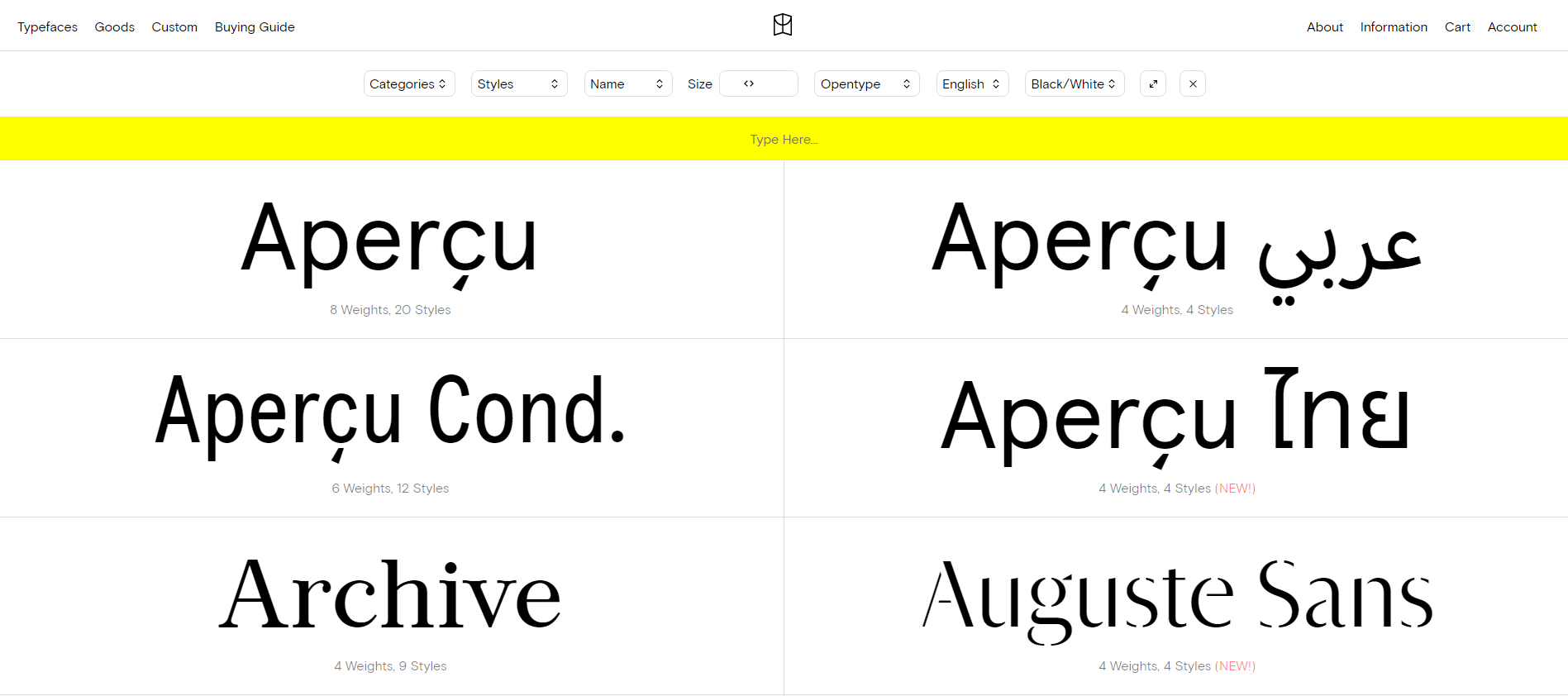
    Colophon font foundry
    Colophon font foundry

    Retailing digital goods can be a highly profitable ecommerce business model.

    By digital goods, we non-physical items which can be bought and downloaded by users, such as ebooks, music, digital artwork, and fonts – even NFTs can fall under this category.

    Ecommerce Inventory Models

    Dropshipping, white-labelling and other examples typically found in lists of ecommerce business models are actually what are more correctly known as ecommerce inventory models.

    Examples of ecommerce inventory models are:

    • Dropshipping
    • Wholesaling and warehousing
    • White-labelling and Private-labelling

    Dropshipping

    Dropshipping is less of a business model, and more of a fulfillment method/inventory model.

    Dropshipping describes the process of distributors/manufacturers sending stock direct to the customers of an ecommerce platform – rather than the platform/retailer having to handle stock themselves.

    Dropshipping can be much more challenging to make work than the gurus will tell you.

    Dropping shipping setups are often beset by a variety of customers service, quality, and logistical problems.

    Print on Demand (POD)

    Print on Demand is a type of dropshipping that allows you to print products on demand, with both manufacturing and distribution handled by the manufacturer.

    Wholesaling and Warehousing

    Wholesaling and warehousing involves purchasing inventory in bulk from manufacturers or distributors, storing it in a warehouse, then selling it to customers.

    White labelling

    White-labelling is the process of adding your own brand to goods mass-manufactured by another company.

    Private labelling

    Private-labelling involves providing a third-party manufacturer with the specifications to have a product built, with your labelling attached.

    Ecommerce SEO

    Traditionally ecommerce SEO focuses primarily on optimising ecommerce sites for best performance in popular external search engines, such as Google and Bing.

    Below we take a look at some of the different sub-types and variants of ecommerce SEO.

    Onsite Search Optimisation

    Onsite search can often be massively important for ecommerce sites. Onsite Search Optimisation concerns the optimisation and improvement of onsite search functions on a website.

    This can involve improving the usability, speed and most importantly the results provided by onsite search systems.

    Marketplace Optimisation

    Marketplace Optimisation, or Marketplace SEO, focuses specifically on the optimisation of products and other features on ecommerce marketplaces, such as Amazon, eBay or Etsy, for example.

    A marketplace can be seen as a single multi-vendor platform that brings together vendors and buyers to facilitate purchases and services.

    Marketplace Optimisation can have numerous sub-levels.

    A vendor may be highly focused on one or more specific markets such as Amazon, and may then be primary concerned with algorithms and optimisation techniques that will be effective on that specific market.

    Amazon SEO for example, focuses on ranking products effectively and delivering traffic / sales on Amazon.

    Looking at ecommerce on a global scale, there are hundreds of different highly popular local ecommerce marketplace websites and apps around the world.

    Comparison Shopping & Google Shopping

    Comparison shopping allows users to compare products and prices.

    Comparison shopping SEO involves putting together and implementing strategies to deliver more sales and traffic from comparison shopping sites and platforms, such as Google Shopping.

    Google Shopping is Google’s in-search product comparison service, which contains a mix of paid and organic product listings.

    CMS Specific Ecommerce SEO

    There are many thousands of different ecommerce platforms available around the world, from widely available open source CMS and plugins, to tightly controlled custom platforms ran by single ecommerce agencies.

    CMS specific ecommerce SEO is focused on specific CMSs and ecommerce platforms. Examples would be Magento, WooCommerce, and Shopify SEO.

    Web3 SEO

    Still very much in the early stages, the last decade or has seen the advent of web 3 and decentralised marketplaces.

    NFTs recently saw a huge surge in popularity and attention, offered for sale in a variety of centralised and decentralised marketplaces.

    Need help with your ecommerce SEO? Check out our ecommerce SEO guide here, or find out more about our ecommerce SEO consultancy services here.

  • Ecommerce SEO Guide – Getting Started, Strategies & Best Practice

    Ecommerce SEO Guide – Getting Started, Strategies & Best Practice

    Ecommerce SEO can be one of the most challenging and complex areas of Search Engine Optimisation.

    In this guide we will cover everything you need to get started with SEO for your ecommerce site.

    What is Ecommerce SEO?

    Ecommerce SEO is the process and application of Search Engine Optimisation techniques when applied to ecommerce focused websites and platforms.

    Ecommerce SEO campaigns can vary in scope but usually involve the optimisation of ecommerce specific site elements such as product listings, categories, feeds/sitemaps, titles and descriptions; as well as standard SEO processes looking at areas such as technical SEO, content, internal links, and offsite SEO/link building.

    Ecommerce SEO as a practice sits under digital marketing and broadly under ecommerce marketing; involving processes designed to generate increased traffic, customers, and ultimately sales for ecommerce operations.

    Getting started

    Whether you are starting from step one, or being tasked with creating an SEO strategy for an established ecommerce site, getting started with an ecommerce SEO strategy can be a little daunting.

    In this guide we are going to try cover as many of the main components of a modern ecommerce SEO strategy as possible.

    If you already have an ecommerce site set up in your platform of choice and have decided which products to sell, you can skip the next few sections.

    If however you are just getting started – read on for some advice on how to choosing an ecommerce platform for SEO and researching the products you are going to sell.

    Woman packing an ecommerce order

    Ecommerce niche, products & store type

    You may already have an idea of which niche you want to enter and the products you want to sell.

    If not, the first steps in setting up an ecommerce site will often involve decisions and research in the following areas:

    • Niches & markets to enter
    • Choosing & sourcing the products to sell
    • Digital or physical goods
    • Hold stock, create products on-demand, or dropship
    • Competitor research

    Niches & Markets

    What is a ‘niche’?

    By niche we are talking about the specific product category or categories in which the products you want to sell will be in.

    Choosing a niche

    Choosing what niche you want to focus may involve something you are interested in, or simply an area where you see a business opportunity.

    You can look at other physical retailers or ecommerce sites in the same or similar industries to find out what they are selling and for how much.

    Keyword and market research is important here to assess the popularity of different product categories.

    What is a market?

    In marketing, a market is a group of potential buyers who may be interested in purchasing a product, and have the legal ability, as well as the resources to do so.

    Choosing a market

    Choosing your target market involves researching your competition, customer base, and any possible opportunities you see across different markets and market-places.

    The location of your market can be significant: there may be competition at a global level but lack of competition in local or regional markets.

    Ecommerce platforms

    Different ecommerce platforms have different features and benefits, as well as limitations and potential drawbacks when it comes to customisation and the ability to optimise a site for SEO.

    Hosted vs Self-hosted

    One of the first distinctions to make between different ecommerce platforms is between hosted and self-hosted.

    Hosted ecommerce platforms such as Shopify or Wix don’t require the purchase of web hosting and or involve as much technical work to build or maintain a site.

    Hosted ecommerce solutions can be great for smaller operations and startups that don’t have technical in-house experience or don’t want to invest resources on development and infrastructure.

    Self-hosted ecommerce platforms such as Magento or WooCommerce require the provision of web hosting, and will usually involve much more technical work to both build and maintain a site.

    Self-hosted sites will often be more powerful in regards to the degree to which they can be customised – something which can be very important when it comes to optimising a site for SEO.

    Choosing an ecommerce platform

    Choosing the right ecommerce platform will involve evaluating a range of services to find the best platform across a range of different commercial and business needs that will relatively be unique to your specific requirements.

    SEO is just one part of the equation, so depending on how SEO fits into your marketing mix it may not be the first consideration when it comes to choosing an ecommerce platform and building a site.

    Often different ecommerce platforms will have some standard SEO functionality, and there may be add-on plugins or modules for SEO and sub-functionalities that you can use to supplement where the barebones setup leaves anything missing.

    At a most basic level almost all platforms will require users to set up an XML sitemap for example.

    Often different platforms will have trial functionality where it may be possible to test out SEO features, and research can be conducted on how many different SEO plugins/modules are available on the market – considering their functionality, support, and potential reliability.

    Best ecommerce platform for SEO?

    Best ecommerce platforms for small sites

    For small ecommerce sites Shopify (paid – hosted) or WooCommerce (free – self hosted) are both good options.

    Shopify is not as freely customisable as WooCommerce, but there are so many different features and add-ons available that you can probably get most of the things running which you would want as a smaller store.

    WooCommerce has a greater degree of flexibility, but depending on how complex you want to make your store you may need to get some development help – as well as having to arrange your web hosting.

    Best ecommerce platforms for larger sites

    For larger operations with significant developer resources most mature ecommerce platforms can be customised to the degree to which SEO changes can be made effectively.

    Custom built and headless platforms can also be best practice at larger scale as the amount of business functions a site needs to perform increases.

    For larger or enterprise businesses that don’t want to invest as highly in infrastructure or developer resources Shopify Plus or BigCommerce are two potential options.

    Ecommerce SEO Strategy

    Creating an effective SEO strategy for ecommerce site, like any good SEO strategy, involves working back from what you want to achieve and then creating an effective plan to achieve your goals.

    For most ecommerce operations the primary goals are likely to be generating an increased amount of relevant organic traffic via additional and improved keyword rankings; leading to increased sales, customers, returning customers, and ultimately: profit.

    In the below guides we will cover some of the main elements involved in building an SEO strategy around those goals.

    At the most basic level ecommerce SEO strategies will usually involve:

    • Onsite SEO & technical auditing
    • Product page optimisation
    • Product category optimisation
    • Navigation optimisation
    • Site speed
    • Core Web Vitals

    For larger sites international SEO, involving multiple site, location, language, and Hreflang implementations are likely be key components of an SEO strategy.

    Keyword research

    Keyword research is integral to ecommerce SEO at multiple levels.

    Keyword research can be used to optimise content and meta information, to acquire more relevant traffic and customers.

    Some of the areas of an ecommerce store which can be optimised include:

    • Product pages
    • Product categories
    • Navigation & internal linking
    • URLs, Tags, filters & facets
    • Homepage
    • Title & meta descriptions
    • Blog and content marketing

    Keyword research can also be used as part of the process of deciding how to structure a site and create search engine friendly product category implementations.

    Product Page SEO

    Product pages are one of the most important components of an ecommerce site.

    For small ecommerce operations with a very small number of products, it is possible to look at individual product listings and work to optimise them for best performance.

    For medium and above sized websites with any significant number of products, optimising product page templates and page features can yield results at scale, across a site.

    Product pages can be optimised in areas such as:

    • Title and meta description
    • Product description & supplementary text
    • Headings
    • Product images & image attributes
    • Internal linking & related products, product options
    • Speed and Core Web Vitals

    Below is a screenshot of product page on the johnlewis.com website.

    johnlewis.com product page

    Some of the features of this product page include:

    • Product heading including brand name and generic product type
    • Multiple product images
    • Product description & specification
    • Customer reviews
    • ‘Shop the look’ and ‘Style it with’ related items
    • ‘Customers also bought’ related items

    Product Structured Data

    Use product structured data to add information to your product pages that Google and other search engines can use to create rich snippets.

    Product rich snippet example in Google desktop search
    Product rich snippet example in Google desktop search

    There are two types of pages that can use product structured data:

    • Product pages that describe a single product
    • Shopping aggregator pages that lists a single product, along with information about different sellers offering that product

    Using product structured data can help your product pages stand out in the search results, generating extra traffic and sales.

    You can test your product structured data using Google’s Rich Results testing tool.

    Product Category SEO

    Product categories are often an essential component of ecommerce sites.

    Improving the SEO performance and usability of product category pages can be a win for users as well as bringing in additional relevant traffic from search engines.

    Areas to look at for product category pages as part of an ecommerce SEO audit include:

    • Title and meta description
    • Category text and headings
    • Internal linking to products, other categories and sub-categories
    • Product images & image attributes
    • Pagination
    • Canonicalisation
    • Speed and Core Web Vitals
    • Product filtering and faceted navigation

    Navigation allows site users and search engine bots to move between the different pages, products and categories on your site.

    Good ecommerce navigation can improve the user experience for users, and the priority you give specific products and categories can be a signal to both users and search engines as to which are the most important.

    Look at navigation elements such as:

    • Mobile menu
    • Main menu / mega menu (if you have one)
    • Filters & faceted navigation
    • Homepage navigation
    • Onsite search
    • Related categories, sub categories and products

    Navigation can be audited for product/category priority and internal linking, and links should be closely audited to ensure they use actual <a> hyperlinks and not buttons or JavaScript based linking.

    Check out our full guide to ecommerce navigation SEO, which includes best practice and examples of good navigation.

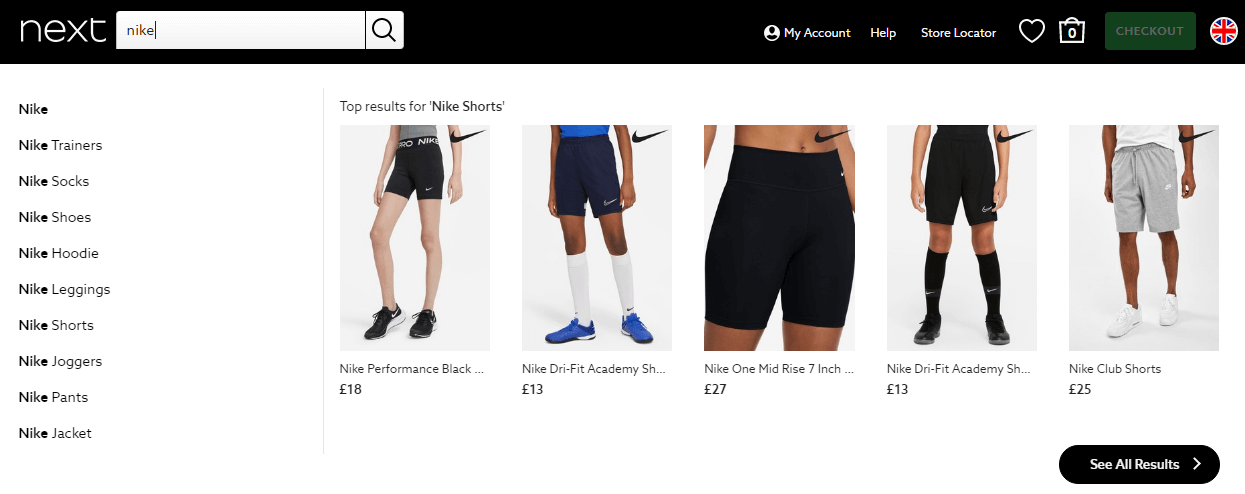
    Auto-complete on the Next website
    Live auto-complete on the Next.co.uk website

    Optimising onsite search on ecommerce sites can yield increased product views and sales.

    Auditing and improving onsite search for usability, aiming for users to get to browse, find and select products with as minimum effort (and clicks/taps) as possible is ideal.

    On a technical note: for search engines, it is important to block bots from search results in the majority of situations – for the simple reason that search engines don’t want to index other search results pages – and it can caused duplicate content issues.

    Site Speed

    Website speed and performance for ecommerce sites is important for SEO and also has been shown in studies to have a direct correlation with page views and sales for ecommerce stores.

    As a baseline it is important to test all the different main areas of your website: your homepage, product pages, category pages and the checkout process to make sure it all runs quickly.

    Core Web Vitals

    Core Web Vitals are a set of user experience signals Google use to measure performance, which is now baked directly in Google’s mobile and desktop search algorithms as confirmed ranking factor.

    Improving the Core Web Vitals of an ecommerce site can have a direct impact on search rankings as well as improving user experience and ultimately traffic/sales.

    In extensive testing and research we have conducted, Core Web Vitals is an area that many ecommerce sites really struggle with for various reasons.

    In the below video you can see a screen recording taken of the Currys.co.uk website, on a top-end desktop computer using an unthrottled 70mbs broadband connection.

    Currys.co.uk screen recording showing severe CLS issues & poor loading performance

    The site suffers from severe Cumulative Layout Shift (CLS) issues that can make browsing the site an unpleasant experience.

    Benchmarking

    The first step is to assess your site and competitor sites to see where you are.

    One way of benchmarking your site initially is to create CrUX Data Studio reports.

    If you find that your site performs significantly worse than your competitors, then you can know for sure you need to put in place measures to rebalance this.

    Testing

    The next step is testing your Core Web Vitals – looking at the site homepage, categories, products, and any other key templates.

    Do not just check the homepage. Check every type of template on your site, starting the ones with the highest traffic.

    Do not just test locally from your own modern desktop computer (which just so happens to be on a high speed broadband connection).

    Conduct tests using a range of different applications, making sure to include mobile tests and tests which throttle performance to simulate lower and mid-end internet connections and devices.

    Monitoring

    It is recommended to monitor your Core Web Vitals on an ongoing basis.

    Monitoring allows you to spot any negative fluctuations in your Core Web Vitals and generally allows you to keep tabs on your scores, so you can see the impact of the improvement works you are putting in place.

    You can monitor Core Web Vitals with paid tools such as DebugBear, or just set up a CRuX CWV report.

    Ecommerce SEO FAQs

    We have tried to answer some of the most common ecommerce SEO frequently asked questions below, that are not answered directly above.

    How do ecommerce sites do SEO?

    Ecommerce SEO can vary in approach depending the size and market. Some ecommerce sites do all their SEO work inhouse, others outsource to an ecommerce SEO agency or consultant. For smaller sites with no budget there are often SEO plugins available to extend the existing functionality of your ecommerce platform.

    Which is the best ecommerce SEO plugin?

    The best SEO plugin can vary a lot for each ecommerce platform, and unfortunately many can be unreliable and unsupported. If possible make sure to find the plugin that seems to offer the features you need and ensure there is reliable and ongoing support available.

  • Amazon deliver £23 billion sponsored ads revenue in 2021

    Amazon deliver £23 billion sponsored ads revenue in 2021

    Amazon.com, Inc, the world’s largest ecommerce platform, this week revealed the 2021 revenue figures for its mammoth sponsored advertising network for the first time ever in a quarterly earnings report for investors.

    Splitting out the earnings figures for the advertising business from AWS and other parts of the Amazon business revealed Amazon delivered $31 billion (£23 billion) of revenue from ecommerce products ads across its platforms in 2021.

    Despite $9.7 billion (£7.1billion) of ad revenue in Q4, alongside record profits, Amazon also announced a 17% increase to the price of Prime membership for its US-based customers – the first increase since 2018 – due to increased operating costs.

    Whilst Amazon’s advertising business is substantial, looking at the revenue split with the rest of the business it still only represents a small percentage of total income.

    At $9.7 billion, sponsored advertising revenue makes up just over 7% of the total reported business revenue of $137.4 billion in Q4 2021 for Amazon.

    Amazon 2021 ads revenue vs other revenue

    Amazon vs Google Ad Revenue

    Google also announced their revenue figures this week, revealing a whopping $209.5 billion (£155 billion) of revenue direct from their advertising business.

    Google’s revenue from advertising has increased over 43% YoY, from $146.9 billion (£108.5 billion) in 2020.

    As this is the first year for Amazon to specify their revenue from advertising we are unable to make a similar comparison.

    Google vs Amazon revenue from advertising in 2021

    Google’s combined advertising business still dwarfs that of Amazon, with 575% more revenue generated from sponsored advertising in 2021 compared to Amazon.

    Ecommerce Product Ad Business

    Similar to when users search in Google, Amazon uses a large percentage of the most visible areas of the page for product searches – both above and below the fold – to host sponsored product and brand ads from paying customers that want to increase their sales on the platform.

    Allowing different brands and vendors to fight among themselves for business makes sponsored product ads a highly profitable revenue source, able to generate income regardless of the number of products actually sold and delivered on the platform.

    Amazon sponsored brand ads for a tablet search
    Amazon sponsored brand ads for a tablet search
    Amazon product ad with product features
    Amazon product ad with product features
    Amazon vertical banner format examples from sidebar
  • Yoast SEO Shopify App: What does it do, and is it worth the price?

    Yoast SEO Shopify App: What does it do, and is it worth the price?

    WordPress SEO plugin specialist Yoast have this month launched a dedicated SEO app for Shopify site owners who want to improve ecommerce SEO performance.

    The Yoast SEO Shopify app has reportedly been in the works for quite a long-time, with Yoast announcing details and pricing on 4th January 2022 – in time for the official launch a few weeks later on the 18th of this month.

    Unlike the well-known Yoast SEO WordPress plugin which works on a freemium model, the Yoast SEO Shopify app requires users to pay a monthly subscription fee – currently set at $19 per month (previously $29 p/m). 

    On the app store listing page, the sales copy states that Yoast SEO for Shopify ‘takes care of all the technical aspects of SEO’ allowing you to ‘outrank your competition’.

    This article will go into a little detail on the history of Yoast SEO, the features of Yoast SEO for Shopify, and most importantly: if the add-on is actually worth paying a monthly fee for.

    What is Yoast SEO?

    Yoast SEO was founded by Joost de Valk in 2010, with the company launching its first plugin for WordPress in the same year named ‘WordPress SEO‘ (now Yoast SEO).

    As the name suggests, Yoast SEO is a WordPress plugin designed to help website owners with Search Engine Optimisation (SEO). 

    The Yoast SEO plugin is highly popular among WordPress users, installed on approximately 9.8 million websites worldwide according to BuiltWith data.

    This means at the time of writing Yoast SEO is installed on 32.3% – just short of one third – of all WordPress installations currently live on the web.

    Yoast SEO is also the largest SEO plugin in terms of size and features, leaving some SEO professionals to describe the plugin as somewhat bloated for the job it needs to do – especially for people who are just using it to set meta tags and other basic functions.

    Yoast SEO can cause issues in the SEO industry, with some site owners mistakenly thinking that simply installing the Yoast SEO plugin on their site is all that needs to be done for SEO, which is almost certainly not the case in the vast majority of situations.

    Yoast SEO has however proven to be a safe and reliable plugin for the most part, with only a very small number of security incidents and bugs quickly resolved over the years.

    Probably the most serious incident in the recent past saw a bug in the Yoast SEO plugin which caused a large number of websites to lose organic (SEO) traffic due to an issue related to media attachments.

    Why is the new Yoast SEO Plugin a big deal?

    Starting and growing an online store can be hard work.

    This is especially true for smaller ecommerce site owners, as well as for ecommerce and marketing managers at SMEs without a big marketing budgets, who may not have the financial resources required to pay the cost of hiring a professional ecommerce SEO consultant.

    One of the hardest parts of ecommerce is simply getting people onto your website to see your products, which is where SEO – and specifically ecommerce SEO comes in.

    The Yoast SEO app for Shopify can potentially help make this challenge easier to overcome, providing a set of basic SEO tools for Shopify users.

    As the most popular WordPress SEO plugin used on millions of sites, Yoast SEO has a good reputation among the general website building public – which means for many people the Yoast brand-name and reputation alone will be enough for them to consider investing in the add-on and paying the relatively low monthly subscription cost.

    Let’s explore the main features of the app below.

    Yoast SEO for Shopify features

    Rich Snippets – stand out in search results

    More than 1.7 million merchants leverage Shopify to sell their products. Of course, standing out in such fierce competition isn’t a piece of cake. But, Yoast SEO can help you do so. 

    Yoast SEO helps you to add structured data to your site, which can result in rich snippets shown in Google.

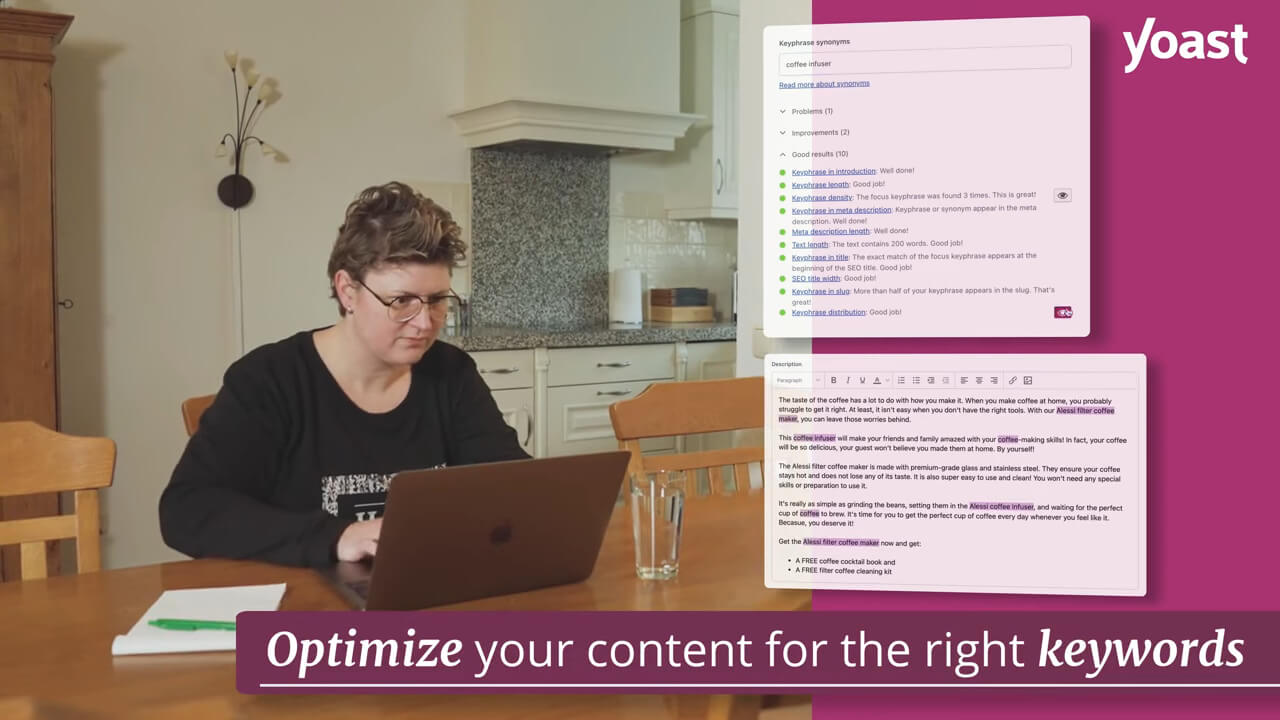
    Yoast SEO for Shopify app screen-capture - © Yoast
    Yoast SEO for Shopify app screen-capture © Yoast

    Not just this, if you’re selling products via social media, Yoast SEO automatically optimises the product to look best on social media.

    Content keyword optimisation

    One of the important ranking factors for Google is high-quality content. But what is high-quality content?

    In short, high-quality content is content that is readable, original and optimized for search engines and users.

    The Yoast SEO for Shopify app provides users with real-time help from the SEO and readability analysis to create high-quality product pages, blogs, and collections that rank in the search results.

    The plugin shows how and where your content can be improved.

    Yoast SEO provides a set of basic tools to help you try to optimise and rank your content more effectively.

    For SEOs these tools are incredibly simple and not very powerful, but for copywriters and normal users they may be useful.

    You can put in a keyword phrase for which you’d like to rank, as shown below.

    Yoast SEO keyword optimisation in Shopify
    Yoast SEO keyword optimisation in Shopify © Yoast

    The tool will then run an analysis of the keyword density and whether the keyword is properly distributed across your text. 

    The idea to leverage keyword optimisation for all the product descriptions you write on product pages to rank better on search engines.

    Improve product page readability

    Readability plays a crucial role in engaging your visitors. 

    According to studies as many as 54% of adults in the US have a hard time reading seventh-grade or above English (as per Flesch-Kincaid score). 

    The plugin provides a set of recommendations to improve usability for the content on the page.

    Product readability info in the Yoast SEO app
    Product readability info in the Yoast SEO app © Yoast

    Bonus

    Paying for a Yoast SEO subscription in Shopify also gets you full access to the Yoast SEO academy courses so you can learn more about SEO.

    Is Yoast SEO for Shopify worth paying for?

    If you are a small ecommerce operation there would certainly be some benefits to using the Yoast SEO app.

    Whether or not it is worth paying $30 a month is really up to your budget.

    It is possible that it could help you sell a few extra products a month and potentially pay for itself.

    However there are a bunch of other SEO apps for Shopify available in the marketplace, which you may want to check out first if you have time to do the research.

    If you just want to go with a solid SEO plugin from a trusted name, Yoast ticks the boxes and will probably work just fine for you.

    Is Yoast SEO for Shopify all you need to optimise an ecommerce store for SEO?

    No. The Yoast SEO app for Shopify is a great start, and will be fine for smaller ecommerce sites.

    However it is certainly not a replacement for hiring or working with a talented ecommerce SEO specialist.

    There are many levels of ecommerce SEO that aren’t covered by the app.

    You can find multiple examples of this in the ecommerce SEO guide we have put together here.

    Update: Price updated (1st April 2022).

    Article checked for accuracy, edited by, and includes contributions from Colin McDermott.

  • How much do Ecommerce SEO services cost in the UK? 2022 Pricing Guide

    How much do Ecommerce SEO services cost in the UK? 2022 Pricing Guide

    Good ecommerce SEO is not cheap. Cheap ecommerce SEO is not good. You get the idea.

    Similarly, the level of work needed on ecommerce sites can vary considerably:

    Ecommerce sites can range in size from smaller sites with a handful of key products, to larger enterprise sites with potentially even millions of products, categories and filters.

    How much do Ecommerce SEO services cost in the UK?

    At Search Candy we work with medium to larger-sized companies, so our minimum pricing for ecommerce SEO is £2,000 per month. This means that we only work with clients that pay at least £2k per month or higher.

    Ecommerce SEO services in the UK can cost anywhere from £250 to £20,000+ per month depending on the site/campaign size.

    Below we will take a detailed look at the pricing levels you can expect to pay for ecommerce SEO services in the UK in 2022 and beyond.

    Starter Ecommerce SEO

    SEO services for smaller ecommerce sites and startups with a low budget.

    For smaller ecommerce sites and new sites with a low budget you may be able to find ecommerce SEO services ranging from £250 to £1500+ per month.

    We wouldn’t recommend paying any less than £500 per month if you want to achieve any significant results.

    This type of budget may be suitable for smaller sites on hosted platforms such as Shopify or Wix.

    At this level you can expect to get some technical/onsite work but there will not be much room for link building or other supplementary work every month.

    To grow more quickly you may to look at expanding to higher level package.

    Mid-level Ecommerce SEO

    Ecommerce SEO services for medium sized ecommerce operations.

    For mid-sized ecommerce sites budgets can range anywhere from £1500 to £5k per month for an ecommerce SEO retainer at an agency.

    This level of budget would be suitable for stores using out-of-the-box self-hosted ecommerce platforms like Magento, BigCommerce and WooCommerce.

    Typically mid-level ecommerce sites will primarily be targeting sales nationally or to a smaller number of international locations.

    Large & Enterprise Ecommerce SEO

    Ecommerce SEO services for large and enterprise level ecommerce operations.

    Ecommerce SEO for larger websites can vary considerably depending on the size and scope of the campaign.

    Larger-sized ecommerce SEO campaigns will generally come in between £5k and £20k per month.

    International SEO is often a major consideration for bigger ecommerce projects, with customers and platforms in different countries and languages.

    Larger ecommerce sites are often built on one or more custom platform/CMS, connected to other often complex back-end systems and infrastructure.

    More modern ecommerce platforms may make heavy use of JavaScript frameworks and headless architectures.

    Need help with ecommerce SEO? At Search Candy we specialise in organic search marketing for ecommerce. Get in touch for a free quote or visit our ecommerce SEO page to find out more.

  • Ecommerce Navigation SEO Best Practice Guide with Examples

    Ecommerce Navigation SEO Best Practice Guide with Examples

    SEO is one of the most important channels in ecommerce, so it is vitally important you make your ecommerce site friendly to Google and other search engines if you want to reap some of that sweet organic traffic.

    Essential reading: just this month Google published additional guidance for ecommerce site owners relating to navigation which can be found here.

    Why is navigation important in ecommerce?

    The navigation menus and process of an ecommerce store can be super important: allowing both users and search engines to understand the structure/hierarchy of your store, enabling them to find their way around the different categories, sections and product offerings.

    For this reason it is important to spend a solid amount of time planning out navigation systems across the site, and of course a strong focus the primary navigation menu to ensure it effectively links to all the key areas of the store. Also to conduct testing to make sure that your navigation systems are functionable, accessible, and easy to use for both customers and search engine bots.

    A poorly designed, slow, or confusing navigation system can lead to both lower sales as well as worse indexing & performance in search engines.

    Search Engine Friendly Ecommerce Navigation

    From an SEO perspective there are a few things you want to avoid if you want bots to be able to easily use your navigation.

    Most of the below tips are focused around the primary navigation menu. However we also drill down into a wide selection of specific navigation systems, providing advice and SEO considerations for each – as well as taking a look at all important mobile menus and Core Web Vitals.

    Navigation links should ideally always be text based, as opposed to using images, animations, or anything else too fancy that a search engine would struggle to read.

    So for example your design team may think it looks creative and cool to link to your toys category using only an animation of a spinning yo-yo – but to simply use the word “Toys” would be far more descriptive.

    Google finds it easiest to understand actual HTML based links, using the <a> tag.

    Avoid using JavaScript based ‘onclick’ type links, and especially avoid using <buttons> as part of your navigation as these are designed for actions, not navigational links – and are not read by Google as links.

    Content Hierarchy & Internal Linking

    Google looks at how many links different pages get and uses this information to assess which content is most important on your site.

    So it is a good idea to ensure the menu links to the most important areas of your site, and avoid pointing too many internal links towards areas which cannot be accessed or indexed by Google.

    So for example linking to your privacy policy as the first link in the navigation on every page might not be sensible, compared to linking to your primary ecommerce category.

    Similarly, as pleasing or easy to program as an alphabetical list may be, it may be more effective to order lists by popularity or choose the order manually.

    It is important to think about your most important keywords and products, then to make sure they are linked to with sufficient priority.

    Similarly think about sub-categories and any important areas. Can Google and users find their way to these pages quickly using the onsite navigation?

    Overly Complex Navigation

    Google recommends avoiding overly complicated navigation which forces users to click dozens of times to get to a specific area or product, and going overboard with segmenting your content into too many niche categories to the point where navigation becomes more difficult.

    Avoid:

    • Creating complex webs of navigation links, for example, linking every page on your site to every other page.
    • Going overboard with slicing and dicing your content (so that it takes twenty clicks to reach from the homepage).

    Source: Google SEO Starter Guide

    Core Web Vitals & Ecom Navigation

    Following Google’s page experience update – whereby fast and user-friendly sites are now eligible to get a boost in the search results – ensuring your navigation is fast loading and Core Web Vitals friendly is very important for SEO.

    Cumulative Layout Shift (CLS)

    Navigation menus that are slow to load (even by just a few split seconds) can be the cause of layout shifts that cause a bad experience for users.

    Diagram of a navigation menu causing CLS on a web page
    Navigation menu causing CLS on a web page – From left to right
    Diagram by SearchCandy.uk

    As ecommerce site navigation often appears at the very top of a page, if the navigation bar or an important element inside it (such as an image, search box or icon) is slow to load – then consequently ‘pops’ into place – it is possible it will push all the other content on the page below it downwards creating an unpleasant layout shift.

    This could be caused by slow loading resources needed by the navigation, and/or by not properly instructing the browser how much space will be required by the navigation when it does eventually load.

    First Input Delay (FID)

    First Input Delay measures the delay from when a user attempts to interact with a webpage and the interaction starting.

    For example if a user were to click a link in a navigation menu, FID measures the delay in how long before the browser begins the process of fulfilling the request to load the new page.

    A delay may be caused by resources/elements on the page loading, or the ‘main thread’ being busy doing other work.

    As well as affecting SEO, the faster users are able to interact with navigational elements the faster they will be able to browse products – which is certain to directly impact sales.

    Spend a suitable amount of time testing, monitoring, and limiting the impact the navigation system has on your site’s Core Web Vitals performance.

    Different Types of Ecommerce Site Navigation

    • Navigation menu / mega menu
    • Onsite Search
    • Product filters
    • Faceted navigation
    • Breadcrumbs
    • Static sitemaps
    • Related products
    • Language/location selector

    The below header example from British ecommerce site Next.co.uk includes a navigation menu and onsite search box, as well as links to key pages such as the account login, checkout, and a language selector.

    Hovering over primary categories in the navigation menu reveals a mega menu format below.

    Faceted Navigation & Product Filters

    Faceted navigation/product filters on the Next.co.uk site (truncated)
    Faceted navigation/product filters on the Next.co.uk site (truncated)

    Faceted navigation is one of the most complex and difficult areas of ecommerce SEO to get right.

    Whether to allow search engines to crawl and index all your product category filters and variations, and how to go about doing it, is a big decision for ecommerce sites – potentially opening up a site to hundreds of thousands, sometimes even millions of extra URLs/parameters for Google to assess.

    Some product filters may be worth indexing – such as the first level of a colour filter – but many other filters may not.

    There is no simple answer to recommend here and Google provide relatively scant resources to assist webmasters in this area, but we can point you towards this document published by Google which lists 5 of the best and worst practices when it comes to faceted navigation – and also this ecommerce URL structure best practice guide.

    Google used to provide a parameter handling tool in Search Console which could be used to let Google know how to treat parameters on your site. This tool was retired in 2022.

    Ecommerce breadcrumb navigation
    Category level breadcrumbs on the JD sports website

    Breadcrumbs are an essential navigational element for any website or ecommerce store.

    Many ecommerce breadcrumb implementations fall down by either not existing at all, or by using a flat structure that misses out categories and sub-categories.

    Home > Example Product

    If your ecommerce breadcrumbs look like the above, they need work!

    Making sure to use the correct breadcrumbs markup is important, with a good implementation potentially being rewarded with breadcrumbs direct in Google search results.

    Breadcrumbs can be used on both product category pages and product pages.

    Google recommend using breadcrumbs that reflect a typical user path to a particularly product or URL, rather than simply mirroring the URL structure.

    So for example a bad breadcrumb structure (with multiple superfluous levels) might be:

    Home > Shop > Products > ID > 343423 > Example Product

    Mega Menus

    Asos.com women's clothing mega menu
    Asos.com women’s clothing mega menu

    Mega menus can be a great way of laying out your product categories and site architecture for users.

    Try to keep to the general principles laid out above, avoiding: overly complex navigation; linking to an excessive number of resources; and considering Core Web Vitals or usability issues.

    One of the primary SEO concerns with mega menus is undoubtedly the high risk of having an excessive number of linked resources.

    For example a menu that has 10 primary categories, each with on average 50 sub-categories/links, would have 500 total links just inside the primary navigation – something which would recur on every single ecommerce page on the website.

    Mega menus can also often be large and unwieldy, being almost always both powered by and heavily reliant on JavaScript resources which may be slow to load and render in the browser.

    Many sites also rely too heavily on mega menus for navigation. Consider the following test: could your users find their way to a specific category or product without using the mega menu? If the answer is no – it is highly likely the site has improvements to be made in terms of navigation and internal linking.

    There are multiple ways potential customers may attempt to find their way around a website, and search based navigation is a method users may choose to utilise – especially if they feel like they are unable to quickly find their way to a resource using the existing navigational UI.

    An effective onsite search engine can allow users to quickly and easily find their way to appropriate products or categories.

    Let’s take another look at Next.co.uk’s onsite search for an example of this.

    The Next search box functionality provides auto-complete suggestions before the user hits enter/taps to search – potentially reducing the user journey by one click or more. See the screenshot below for an example of this.

    Next.co.uk onsite search auto-complete
    Next.co.uk auto-complete example. At this point the user has entered only ‘Nike’ into the search box, without hitting enter.

    Another potentially good strategy is redirecting searches to specific products, ranges or category pages in some situations – which can save a step in the user journey if done effectively and without any frustrating errors.

    For example on a grocery ecommerce store a search for [vegan] could redirect users directly to the primary vegan range/category, rather than simply listing all search results that include the word ‘vegan’.

    Blocking Search Results from Search Engines

    From an SEO perspective it is important to ensure that onsite search results pages are blocked from indexing by offsite search engines, such as Google and Bing.

    A robots.txt disallow rule is not strong enough here. A noindex based solution is going to be ideal for most situations – to fully prevent Google from indexing the results.

    Why is it important to block Google/search engines from search results pages? Allowing search results pages to get indexed can create an attack vector for hackers/spammers, as well as potentially causing SEO issues.

    Here are some UK based ecommerce sites that have not blocked their search pages from indexing:

    Clintons Cards

    Clintons cards Google results

    Casio

    Casio.co.uk Google results

    Mobile menus & navigation

    With the majority of visitors to ecommerce sites now being on mobiles for many sites and industries, and Google having moved firmly towards mobile first indexing, getting your mobile menus right is vitally important for both users and SEO.

    There is a huge amount to consider when building and optimising a mobile navigation and menu system. It is worth considering that mobile navigation/UI includes more than just a standard mobile menu, especially on ecommerce sites.

    For example let’s take a look at the UK fashion etailer Missguided.co.uk. Note before we even look at what most would consider standard mobile menu accessed via the hamburger icon, we can already navigate using swipeable sub-menu of trending/featured categories, breadcrumbs, links to important sub-categories with images, and a product filtering system.

    Having the mobile menu in a swipeable format in theory could save potential customers a click when accessing popular resources. It also means the links are in plain sight for both visitors and search engines.

    Next up is an example from global ecommerce giant Ikea. The first image shows the upper navigation area for mobiles, which includes a prominent search box (including a visual search feature), delivery and store information, breadcrumbs, and a mobile menu with a hamburger icon.

    Ikea mobile menu

    The mobile menu features two very prominent links dividing up the two main ways users can find their way to products – via a product list, or a list of rooms. Clicking either of the two primary links brings users to a list of resources without refreshing the page or leaving the menu system.

    HTML Sitemap

    Internal linking is important for SEO, and a good HTML sitemap can potentially help with internal linking across an ecommerce site.

    Static sitemaps can also be useful for users who by last resort have been forced to use a sitemap to find their way around a large website.

    Tip: Neither users nor search engines should NEED to rely on HTML sitemaps to easily navigate a site. There should ideally already be an effective and intuitive to navigate UI, that doesn’t require users to have to find what they need by browsing a large and cumbersome HTML sitemap.

    Sitemaps can be designed to cover an entire site, or just specific sections or page types. For example the Asos.com site features HTML sitemaps listing brands (see below).

    Asos.com HTML sitemap example
    Asos.com HTML sitemap example

    Search Candy provide ecommerce SEO consultancy services. Get in touch to book a free initial consultation with an ecommerce SEO expert.